

Overview: Online spare parts ordering helps OEM dealers identify, verify, and order the correct replacement parts through a digital workflow. Electronic parts catalog software supports this process by organizing part numbers, diagrams, applicability, pricing, alternate parts, and superseded parts in a searchable system. Dealers can find parts by part number, keyword, model, or variant, visually confirm the correct component, check compatibility, and move directly to ordering. By replacing static PDFs, printed catalogs, and manual lookups, this approach can reduce parts identification errors, unnecessary returns, ordering delays, and dependence on OEM support teams.

Key Takeaways:
- Online spare parts ordering connects parts identification, verification, and order placement in a single digital workflow.
- Accurate part identification through search, diagrams, and applicability data is the foundation of reliable online ordering.
- Alternate and superseded parts data helps dealers avoid ordering discontinued or incorrect parts.
- Catalog updates need to reach every dealer at the same time, which static documents cannot guarantee.
- Online ordering works best when it is connected directly to the parts catalog, not handled as a separate step.
- ERP and dealer management system integrations, where available, help keep pricing and inventory data up to date.
- The right software choice depends on search depth, catalog update workflows, and how well ordering connects with identification.
See How Intelli Catalog Simplifies Online Spare Parts Ordering. Book a Demo
What Is Online Spare Parts Ordering?
Online spare parts ordering is the process of identifying, verifying, and purchasing replacement parts through a digital platform. For OEMs and dealers, the process typically combines parts search, model and variant selection, applicability checks, pricing and availability, and order placement in one workflow.
For OEMs, online spare parts ordering can make it easier to manage genuine parts sales across a dealer network. Dealers can search for parts by number, keyword, model, or variant, confirm that the part is correct, and place an order without relying on phone calls, emails, or manual catalog lookups.
For automotive OEMs, online automotive parts ordering can simplify the process of identifying vehicle-specific parts and placing orders through authorized dealer networks.
Why Do OEMs Need Electronic Parts Catalog Software?
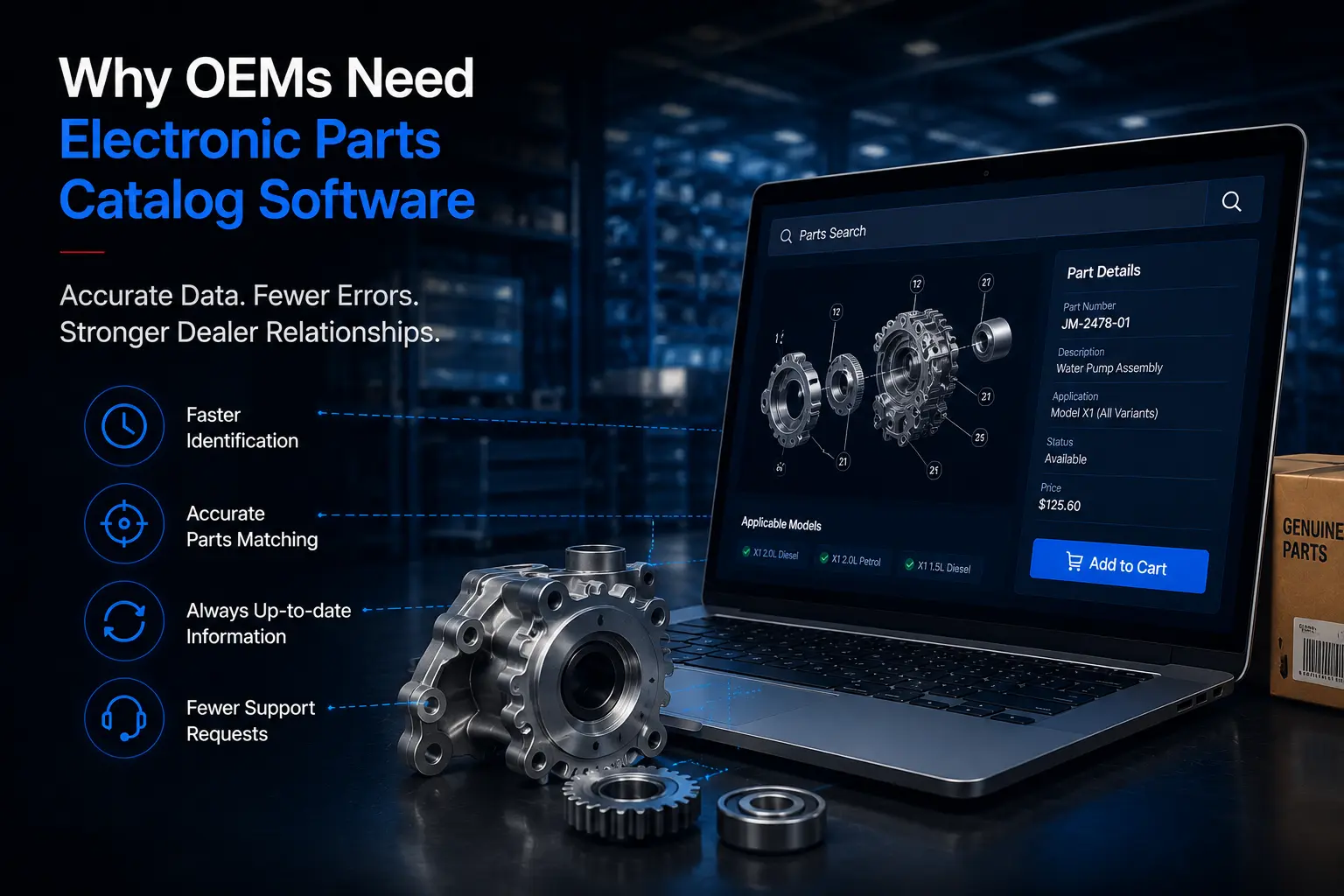
OEMs need electronic parts catalog software because static catalogs slow down parts identification, create ordering errors, and are difficult to keep current across a dealer network. The result is more manual support requests, more returns, and a slower ordering process for dealers.
The operational impact can extend beyond returns. HCLSoftware reports that its Digital Catalog customers have achieved an 80% reduction in time spent placing parts orders and a 90% reduction in parts-related customer-support calls.
Common problems with static or printed catalogs:
- Outdated information. A printed catalog or PDF reflects the parts data available on the day it was published. Price changes, new parts, and discontinued parts are not reflected until the next reprint or file update.
- Difficult parts identification. Without structured search, dealers rely on part number memory, printed indexes, or calls to the OEM parts desk.
- Manual dealer support. Every unclear part lookup becomes a support ticket or phone call, adding load to OEM parts teams.
- Wrong-part selection. When applicability and supersession data are not visible at the point of search, dealers are more likely to select the wrong part.
- Parts returns. An incorrect part must be shipped back, restocked, and reordered correctly.
- Ordering delays. Manual identification and order entry add time between a dealer needing a part and that part being on order.
- Large catalog libraries. OEMs with thousands of SKUs across multiple models and variants cannot manage that volume in spreadsheets or static files without errors.
- Distributing updates. Getting a catalog change to every dealer in a network, especially a large or global one, is slow and inconsistent with printed or file-based catalogs.
How Does Electronic Parts Catalog Software Simplify Parts Identification?
Electronic parts catalog software makes parts identification easier by bringing search, visual diagrams, and applicability data together in a single workflow. Instead of relying on part descriptions alone, dealers can search by part number or keyword, visually verify the part, and confirm its fit for the specific model or variant they are working with.

Core identification tools:
- Part number search. Direct lookup when the dealer already has a number from a nameplate, old part, or service record.
- Keyword search. Useful when the dealer knows the part's function or description but not its number.
- Model-based navigation. Narrows the catalog to the parts relevant to a specific product line or model.
- Variant-based navigation. Accounts for differences within a model, such as engine type, trim, or configuration, where the correct part can vary.
- Visual diagrams and exploded views. Let dealers confirm a part visually against the actual assembly, reducing guesswork from text descriptions alone.
- Attributes. Additional specifications, such as size, material, or compatibility, that distinguish similar-looking parts.
- Alternate parts. Shows equivalent parts when the primary option is unavailable or a comparable part exists.
- Superseded parts. Flags when an older part number has been replaced, so dealers do not order a discontinued item by mistake.
Together, these capabilities move the dealer from searching for a part to confirming the correct part, which is the step that most affects order accuracy.
How Does Electronic Parts Catalog Software Support Online Spare Parts Ordering?
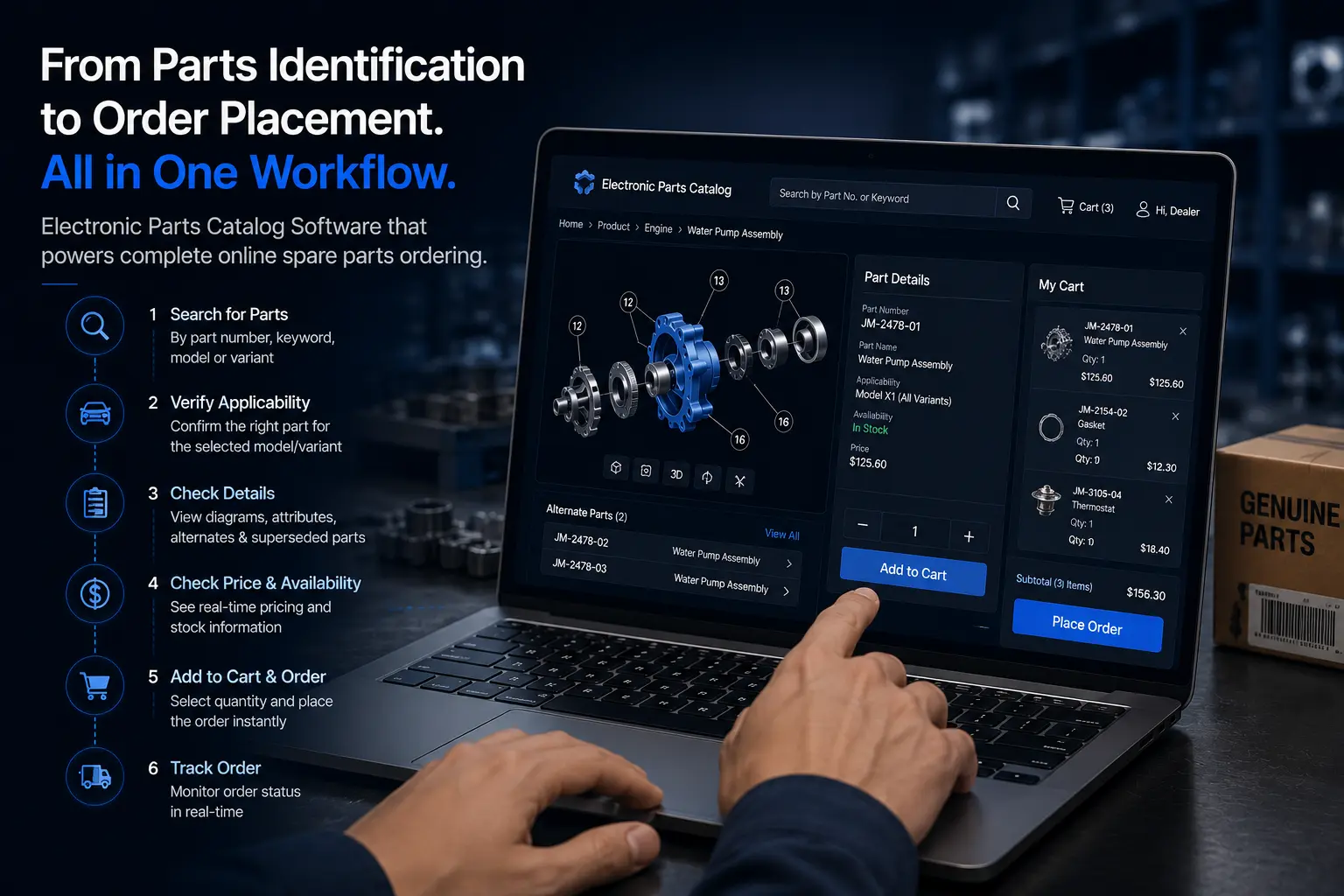
Electronic parts catalog software supports online spare parts ordering by connecting part identification directly to order placement. Dealers can find the right part, verify its applicability, and place the order within the same workflow, without switching between systems. A typical ordering journey looks like this:
For OEMs, this workflow is particularly important for OEM spare parts ordering, where dealers need to identify genuine parts accurately before placing an order.
- Dealer searches for a part using a number, keyword, model, or variant.
- Dealer identifies the relevant application and confirms the model and variant match.
- Dealer checks applicable parts, including any variant-specific options.
- Dealer reviews part information, such as diagrams, attributes, and compatibility notes.
- Dealer checks pricing and availability.
- Dealer selects the required quantity for the order.
- Dealer places the order directly from the catalog interface.
- Dealer tracks the order, where the platform supports order status visibility.
Not every electronic parts catalog supports the same depth of ordering and tracking functionality. Some platforms handle identification and hand off to a separate order management or dealer management system; others support ordering directly within the catalog. OEMs evaluating software should confirm which of these steps are supported natively versus through integration.
What Features Support Online Spare Parts Ordering?
Effective online spare parts ordering depends on three capabilities: accurate parts identification, centralized catalog management, and a direct path to order placement.
Identification
- Visual parts identification and exploded diagrams
- Part number and keyword search
- Model and variant navigation
- Parts applicability logic
- Alternate parts and supersession management
- Side-by-side parts comparison
Catalog management
- Centralized catalog updates
- Pricing information, including historical pricing where relevant
- Mobile accessibility for dealer and field use
Ordering and integration
- Dealer access controls
- Online ordering
- ERP integration
- Dealer management system (DMS) integration
Electronic Parts Catalog vs. Traditional Parts Catalog
The table below compares a traditional printed or PDF parts catalog with an electronic parts catalog across the attributes that most affect dealer ordering.

What Are the Benefits of Online Spare Parts Ordering?
Online spare parts ordering benefits OEMs and dealers by reducing the errors and delays associated with manual parts identification and order processing. Each catalog capability supports a specific operational improvement.
Quanos reports 20% fewer incorrect orders, 30% fewer calls to the order hotline, and 20% less time spent processing orders after implementing its digital spare-parts ordering solution.
- Faster parts identification reduces the time a dealer spends before placing an order, because search and diagrams replace manual lookup.
- Fewer ordering errors follow from accurate applicability and supersession data, since the dealer sees the correct part before ordering, not after.
- Fewer unnecessary returns result directly from fewer ordering errors, cutting the shipping and restocking costs tied to wrong parts.
- Less manual support results when dealers can handle parts identification themselves instead of contacting the OEM parts desk for every unclear lookup.
- Easier catalog maintenance comes from managing parts data in one central source rather than across multiple printed or file-based versions.
- Faster access to updated information means dealers are never working from an outdated price list or superseded part number.
- Better dealer experience is the combined effect of faster search, accurate identification, and a direct path to ordering.
- More efficient ordering follows when identification and ordering are part of the same workflow rather than separate systems.
- Better visibility into parts information gives dealers confidence in what they are ordering, including alternates and applicability.
- Support for genuine-parts sales comes from making it easier for dealers to find and order OEM parts instead of defaulting to unverified aftermarket alternatives.
What Information Should an Electronic Parts Catalog Contain?
An electronic parts catalog should contain the data dealers need to identify a part correctly and complete an order without leaving the system. Missing or incomplete data at this stage is what causes wrong-part orders further down the process.
Core data to include:
- Part numbers and descriptions
- Model and variant information
- Applicability details by model, variant, and configuration
- Diagrams and exploded views
- Part attributes (size, material, specification)
- Alternate parts
- Superseded parts and supersession history
- Pricing, including historical pricing where relevant
- Availability, where supported
- Ordering information and workflows
- Technical notes, where relevant to installation or compatibility
OEMs planning or evaluating a parts catalog should treat this as a checklist for data completeness, not just a list of software features.
How Do You Choose Electronic Parts Catalog Software for Your Dealer?
Choosing electronic parts catalog software comes down to evaluating search depth, catalog management workflows, and how well the platform connects identification to ordering. The checklist below covers the areas that matter most for an OEM evaluation.
- Search functionality: part number, keyword, model, and variant search
- Visual parts identification: diagrams and exploded views, not just text descriptions
- Model and variant management: how the catalog handles configuration-level differences
- Applicability management: how clearly the system shows what fits what
- Alternate parts: whether equivalents are surfaced automatically
- Supersession management: whether discontinued numbers are flagged, not just removed
- Catalog update workflows: how updates are pushed to dealers, and how fast
- Pricing management: current pricing, and historical pricing if your business needs it
- Ordering capability: whether ordering happens inside the catalog or in a separate system
- ERP integration: whether the catalog connects to your existing ERP or SAP environment
- DMS integration: whether it connects to dealer management systems already in use
- Mobile accessibility: usability for dealer staff working away from a desktop
- User experience: how easily non-technical dealer staff can navigate the system
- Security and access control: role-based access across dealer networks
- Scalability: whether the platform holds up as SKU count and dealer count grow
- Reporting: visibility into search behavior, order patterns, and catalog gaps
- Vendor support: how the vendor supports onboarding, updates, and issue resolution
No single platform will be the strongest option on every criterion. The right choice depends on which of these matter most for your dealer network and parts operation.
How Intelli Catalog Supports Online Spare Parts Ordering?
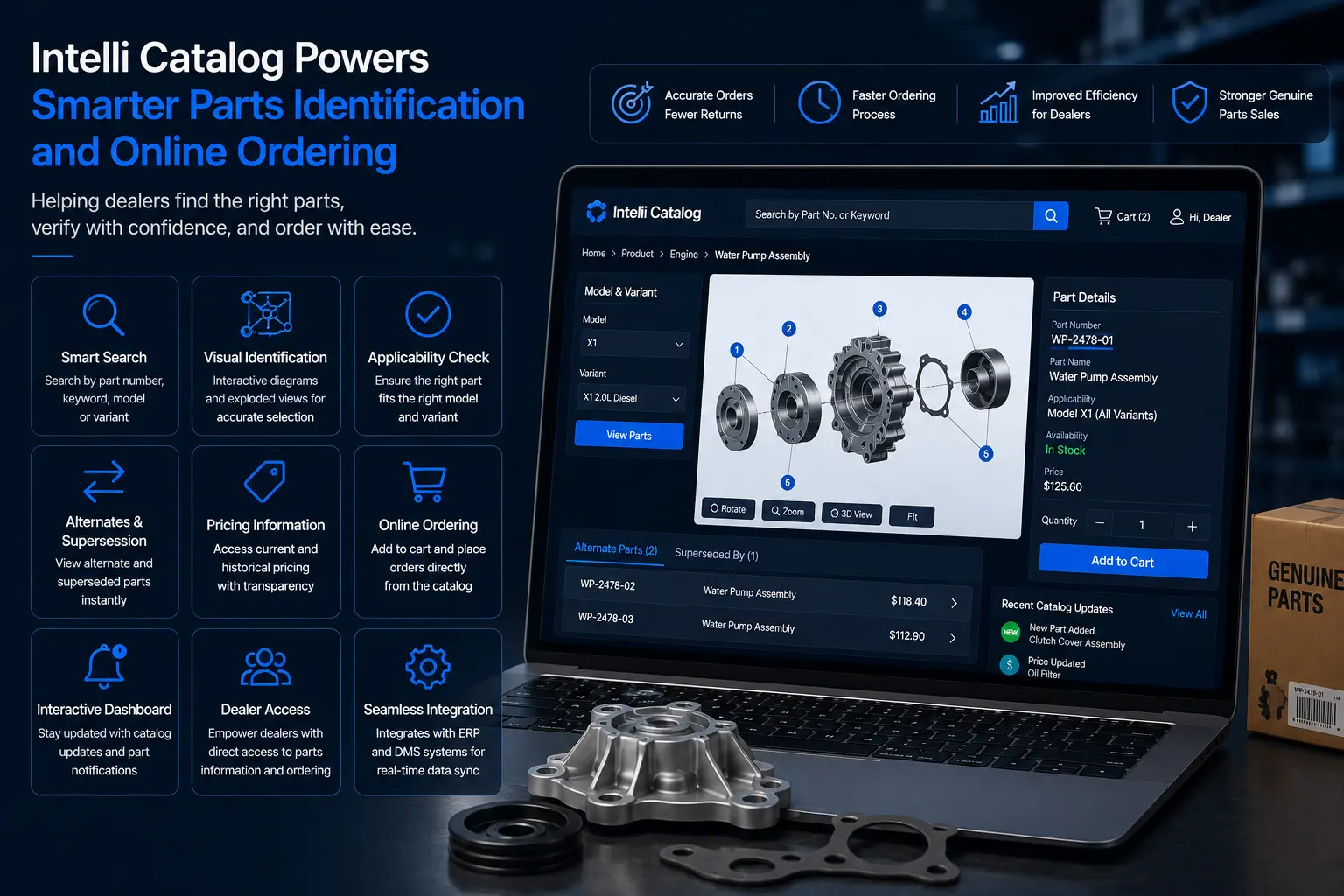
Intelli Catalog is an illustrated electronic parts catalog system designed to support the identification-to-ordering workflow described above. It gives dealers a structured way to search for, verify, and order parts while providing OEMs with a central system for managing parts data.
Relevant capabilities include:
- Search by part number, keyword, model, or variant, so dealers can start from whatever information they already have.
- Visual parts information, including diagrams that help dealers confirm the correct part before ordering.
- Parts applicability, showing which parts fit which models and variants.
- Alternate and superseded parts, flagged at the point of search rather than discovered after an order is placed.
- Parts comparison, letting dealers view multiple similar parts side by side before choosing.
- Current and historical pricing, so dealers can see the latest price along with prior pricing for reference.
- An interactive dashboard, used to surface catalog updates and part-related notifications to dealers as they work.
- Dealer access, with the catalog available directly to dealer users rather than routed through OEM staff for every lookup.
- Online ordering, connecting the identification workflow to order placement.
- Catalog updates, managed centrally by the OEM and reflected across the dealer network.
- Integration with ERP and dealer management systems, where supported, to keep pricing and order data aligned with existing OEM infrastructure.
Intelli Catalog is one way OEMs can put the identification-to-ordering workflow described in this article into practice for their own dealer networks.
Conclusion
Online spare parts ordering gives OEMs and dealers a faster, more structured way to identify, verify, and purchase replacement parts. Electronic parts catalog software supports this process by bringing part numbers, diagrams, applicability, alternate and superseded parts, pricing, and ordering into one system.
For OEMs, a centralized catalog also ensures that dealers have access to current parts information across the network. With the right integrations, it can connect parts identification with ERP, DMS, and online ordering workflows, creating a smoother process from part search to order placement.
Book a demo to see how Intelli Catalog can help your team simplify online spare parts ordering, improve parts identification, and streamline ordering across your dealer network.
Frequently Asked Questions
What is online spare parts ordering?
Online spare parts ordering is the process of identifying, verifying, and purchasing replacement parts through a digital platform. For OEMs and dealers, it typically combines parts search, applicability checks, pricing and availability, and order placement in a single workflow.
What is OEM spare parts ordering?
OEM spare parts ordering is the process of purchasing genuine replacement parts directly through an OEM's authorized digital ordering channel or dealer network. A digital parts catalog can help dealers identify the correct OEM part before placing an order.
How does online automotive parts ordering work?
Online automotive parts ordering typically starts with a dealer searching for a part by number, keyword, model, or vehicle configuration. The dealer then verifies applicability, checks pricing and availability, selects the required quantity, and places the order through the connected ordering system.
What are the benefits of online parts ordering for dealers?
Online parts ordering for dealers reduces manual part lookups, makes current parts information easier to access, and connects part identification with ordering. This can help dealers reduce ordering errors, unnecessary returns, and calls to OEM parts teams.
What is the difference between an electronic parts catalog and a PDF parts catalog?
A PDF is fixed at publication and cannot reflect live pricing, applicability logic, or superseded part numbers. An electronic parts catalog updates centrally, so dealers always see current part numbers, pricing, and alternate or superseded parts.
Can electronic parts catalog software support online parts ordering?
Many platforms connect identification directly to ordering, letting dealers place an order after confirming the correct part. The extent of ordering and tracking functionality varies by platform, so OEMs should confirm which steps are supported natively.


Explore More Insights






.webp)


About the Author


Nishant Sharma
Nishant Sharma is the Marketing & Sales Lead at Intellinet Systems, specializing in B2B sales, digital marketing, and automotive aftermarket solutions. With extensive experience in driving business growth, lead generation, and go-to-market strategies, he is passionate about helping businesses adopt innovative technologies that enhance operational efficiency and customer experience. Through his articles, Nishant shares practical insights on industry trends, emerging technologies, and best practices shaping the future of the automotive aftermarket.


