

Overview: Technical support software for OEMs manages the full lifecycle of dealer field issues from initial report through root cause resolution. Core functionality includes TAR creation with VIN linkage, FTR consolidation for pattern-level investigation, SLA enforcement with aging alerts, product concern documentation for supplier and quality management, and knowledge base publication for dealer self-service. It reduces warranty costs by improving issue resolution speed, enabling root cause analysis on recurring failures, and creating an audit-ready documentation trail. Platforms like Intelli Desk are purpose-built for OEM dealer networks in automotive, construction, agriculture, and industrial equipment sectors.

Every OEM service department knows the call. A dealer service manager has a unit on the lift, a customer waiting, and a fault the shop cannot isolate. They email a photo. They call the regional rep. Two days later, nobody can say which message holds the latest answer.
That is how dealer technical support still runs at many manufacturers. It works at low volume. It breaks when the network grows, the product line gets more complex, and the same failure shows up in three regions before anyone connects the case.
This article explains how technical support software for OEMs fixes that. It covers the path from dealer request to resolution, the features worth requiring, and the questions to ask before you buy.
Book a demo to see how Intelli Desk can help OEMs manage dealer field issues from TAR through resolution.
What Is Technical Support Software for OEMs?
Technical support software for OEMs is a structured field issue management system built around the dealer-to-manufacturer technical workflow. It allows dealers to log technical issues as Technical Assistance Requests (TARs), helps service teams review, assign, and escalate cases, and consolidates related issues into Field Technical Reports (FTRs). The system tracks product concerns, response times and resolutions, supports root cause analysis, and captures resolved cases in a searchable knowledge base for future reference.
It is more than a generic tool. Here is what it is not:
- A ticketing system: A generic help desk treats every request as a plain ticket. It does not know what a VIN is, what a service bulletin is, or how supplier recovery works, so your team ends up tracking those things on the side.
- A field service: Dispatch and scheduling help technicians get to the job. They do not escalate a failure pattern to engineering or tie a case to a product concern.
- A digital form: A form captures a report once. It does not route the case, start an SLA clock, or connect the report to similar cases from other dealers.
- A report generator: A tody PDF still leaves the case sitting in someone’s inbox, and the person who needs it may never see it.
What Does Technical Support Software Manage?
- Dealer technical requests and TARs: Every request arrives in a standard format, with a clear owner and a start time, instead of as a loose email or phone call.
- Field Technical Reports (FTRs): Related TARs are grouped into one case so the back office reviews the pattern once, not case by case.
- VIN or serial number, model, and build data: These tie each case to a specific unit so the ORM can see exactly what was built and sold.
- Customer and equipment information: The case carries owner, location, hours or mileage, and configuration, so nobody calls the dealer to ask again.
- Photos, videos, repair orders, and diagnostic files: Evidence stays attached to the case where the specialist who needs it can open it.
- Service history and warranty status: The service manager sees prior repairs, open bulletins, and coverage before writing the first reply.
- Escalations to the back office: A case moves up with its full history, so engineering does not start by asking what the dealer already tried.
- Product concerns and supplier communication: Broader issues and supplier responses are documented against the cases that triggered them.
- SLA clocks and case aging: Each case shows how long it has been open against its target, so late cases are visible without anyone digging.
- Resolution records and knowledge base articles: The fix is documented in a form that dealers can find and reuse later.
Why Do OEMs Need to Move Beyond Email, Spreadsheets, and Paper-Based Field Reports?

Email, spreadsheets, and paper reports fail because they keep information in separate places and rely on people to connect it. Dealers send incomplete details, offices retype data, similar cases stay separate, and closed cases disappear. OEMs pay the price through slow responses, repeat repairs, and missed product quality signals.
Manual field reporting creates duplicate work.
A technician fills out a paper form in the bay. The service advisor scans it. Someone at the OEM retypes it into a spreadsheet. One wrong digit in the VIN and the warranty history never matches the case.
Every handoff adds delay and another chance for error. The dealer waits while the OEM cleans up data the dealer already entered once.
Fragmented systems hide recurring problems.
One dealer in Texas reports a hydraulic leak. A dealer in Ohio reports the same leak a month later. Each service manager answers their own case. Unless someone happens to remember both, the OEM never sees a pattern.
Incomplete data slows diagnosis.
The most common reason a TAR stalls is missing information:
- VIN or serial number left off or mistyped: Without it, the service manager cannot pull service history or warranty status, and the case waits for a correction.
- No photo or video of the failure: A leak, a wiring chafe, or an intermittent noise is hard to judge from a text description alone.
- No service history, mileage or hours: A failure at 4,000 reads very differently from one at 400, and the dealer may not have said which.
- No parts information: If nobody records what was already replaced, the OEMs suggest parts the dealer has already tried.
- No clear description of when the fault occurs: Cold start, under load, after a long run: the trigger is often the key clue and is often missing.
Each gap triggers another round of communication with the dealer while the vehicle remains in the service bay and the customer waits.
Closed cases become lost knowledge.
When a case is closed, the fix usually stays in an email thread. The next dealer who sees the same fault starts from zero. A resolved case should become a reusable article, not a buried message.
How Does OEM Technical Support Software Work From Dealer Issue to Resolution?
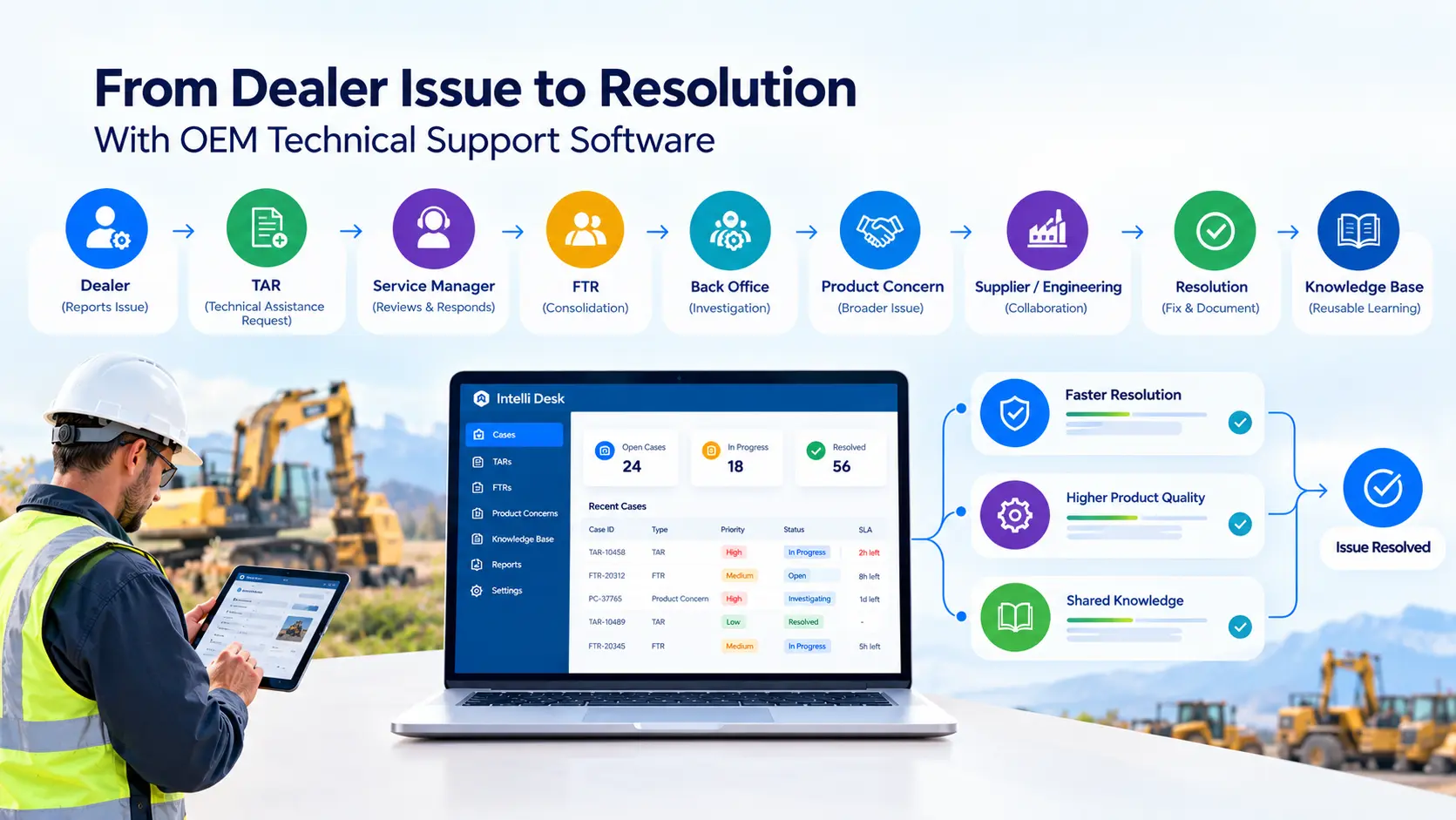
The software moves each dealer issue through a fixed path: a TAR from the dealer, a response from the service manager, an FTR when cases need wider review, back-office investigation, a product concern if the problem is broader, a documented resolution, and a knowledge base article. Every step stays in one record.
Dealer —> TAR —> Service Manager —> FTR —> Back Office —> Product Concern —> Supplier or Engineering —> Resolution —> Knowledge Base
Step 1: The dealer submits a Technical Assistance Request (TAR)
The TAR is the front door. A good one captures:
- Problem description and observed symptoms: The dealer states what the unit does, when it does it, and what the technician has already checked.
- VIN or serial number and affected product: This identifies the exact unit, model year, and build, so the response starts from the right parts and bulletins.
- Photos, videos, and repair order scans: Evidence lets the service manager see the fault rather than just interpret a description of it.
- Priority level: A machine that is down on a job site should not wait in the same queue as a cosmetic question.
- Dealer and contact information: The service manager knows who to call and which dealer the case belongs to, which matters when the dealer counts patterns.
VIN linkage matters most. With the VIN attached, the OEM can pull service history, warranty coverage, and any open bulletin on that unit before answering. A service manager looking at a hydraulic failure on a three-year-old machine with a known pump bulletin is in a very different position than one reading a bare description.
Step 2: The service manager reviews and responds
The case routes to a designated service manager. They assign the issue, conduct an initial diagnosis, request any missing information from the dealer, and escalate it if the answer is not readily available. Many TARs close here, but the rest move up.
Step 3: Related TARs are consolidated into an FTR
A TAR captures an individual dealer’s issue, while an FTR brings related TARs together when the OEM needs a broader investigation.
Say five TARs from different dealers describe the same intermittent electrical fault on one model year. Five separate email threads cannot support a root cause analysis. One FTR, with all five units and all the evidence, can. It also changes priority: one TAR reads as an anecdote, while an FTR covering twelve units across eight markets reads as a problem.
Step 4: Back-office teams investigate the issue
Engineering, technical specialists, quality, warranty, and supplier teams work from the same consolidated evidence. They no longer chase photos and VINs through inboxes. They can see which units failed, under what conditions, and what the dealers already tried.
Step 5: Create a product concern when the issue is broader
The flow becomes TAR to FTR to product concern. The concern records what the individual cases cannot:
- Affected models and production batches: The OEM can say which units are exposed, not just which ones were reported.
- Components involved: The concern names the part, assembly, or supplier lot, so engineering and purchasing look at the same thing.
- Failure conditions and scope: Operating conditions, duty cycles, and the number of units involved help determine whether the issue is isolated or widespread.
- Engineering findings: Test results and teardown notes are stored with the case, not in a separate file nobody can find.
- Supplier involvement: Requests, responses, and agreed actions with the supplier are logged in one place.
- Interim guidance for dealers: While root cause is open, dealers get clear instructions on what to check, what to avoid, and when to stop and call.
- Corrective action: The final fix, any running change, and any dealer action are recorded and linked back to the original cases.
This record is the evidence base for supplier discussions. A supplier will not accept a complaint. A supplier will respond to documented failure data.
Step 6: Resolve and document the issue
The resolution is written down: the repair instruction, the replacement recommendation, the supplier response, the corrective action, and the message back to dealers. The dealer gets one clear answer, and the OEM keeps the record.
Step 7: Turn the resolution into reusable knowledge
The loop closes when a reviewed case is published to the dealer knowledge base. A dealer who sees the same fault next quarter can search first. Many of those cases never become TARs.
What Features Should OEMs Look for in Technical Support Software?
Look for structured TAR and FTR workflows, VIN-linked records, mobile and offline capture, required fields, SLA tracking, supplier collaboration, reporting, a knowledge base, and links to warranty and parts systems. If a vendor cannot show these working together, you are buying a ticketing tool with an OEM label.
- Structured TAR and FTR workflows
The system should support TAR creation, FTR consolidation, escalation, product concern creation, and clear case ownership. Ask to see a TAR become an FTR in one step, not through an export.
- VIN and serial number tracking
Every case should attach to a specific unit. That gives you the affected unit, its service and warranty history, previous issues, and equipment history. Without it, correlation across cases stays manual.
- Mobile field reporting
Technicians and field reps work on phones and tablets, not desktops. They should be able to capture photos, videos, and documents on site and update a case from the shop floor or the customer’s yard.
- Offline data capture
Rural dealers, job sites, and mine yards often have poor signal. Ask whether reports can be saved offline and synchronized once the connection returns. Not every platform does this, so confirm it during the technical support software demo.
- Required fields and standardized forms
Mandatory fields stop incomplete submissions at the source. If a TAR cannot be submitted without a VIN, a symptom description, and a photo, your service managers stop spending the first day of every case asking for them.
- Customizable workflows
A tractor OEM and an automotive OEM do not run the same process. You need configurable fields, issue categories, priorities, and business rules so the software adapts to your dealer network, rather than the other way around.
- Real-time technician visibility
For OEMs with field service reps or company technicians, location, job status, travel time, and time on site help managers see where work stands. Map views and geofencing can support this. Treat it as a supporting capability, not the center of the system.
- Scheduling and dispatch
Assigning jobs by technician availability, skills, and location, with automated notifications, cuts the phone calls that fill a service manager’s day. Again, this supports the core workflow. It does not replace it.
- SLA tracking and escalation
Response and resolution targets should be set by priority, with case aging, overdue alerts, and automatic escalation. Color-coded aging helps a manager scan a queue and see what is about to go wrong.
- Centralized communication
Messages between the dealer, service manager, back office, and supplier should live on the case, not in separate inboxes. Chat, images, video, and remote assistance all belong in one thread.
- Parts and inventory visibility
Many field issues end in a parts decision. The case should show which parts were used, which are unavailable, and the equipment’s configuration. Link to your parts catalog so the dealer orders the right part the first time.
- Analytics and reporting
You should be able to report on case volume, response time, resolution time, recurring issues, failure rates, SLA compliance, and trends by dealer, region, and model. If reporting requires exporting to a spreadsheet, it will not get done.
- Knowledge base integration
Resolved cases should be added to a searchable dealer knowledge base after a review. That keeps institutional knowledge in the system instead of in a few experienced people’s heads.
- Integration with existing OEM systems
Connect the technical support system to ERP, warranty, parts catalog, service history, and customer or equipment data. When a field issue traces to a failed component, the warranty claim and the supplier recovery case should be one click away.
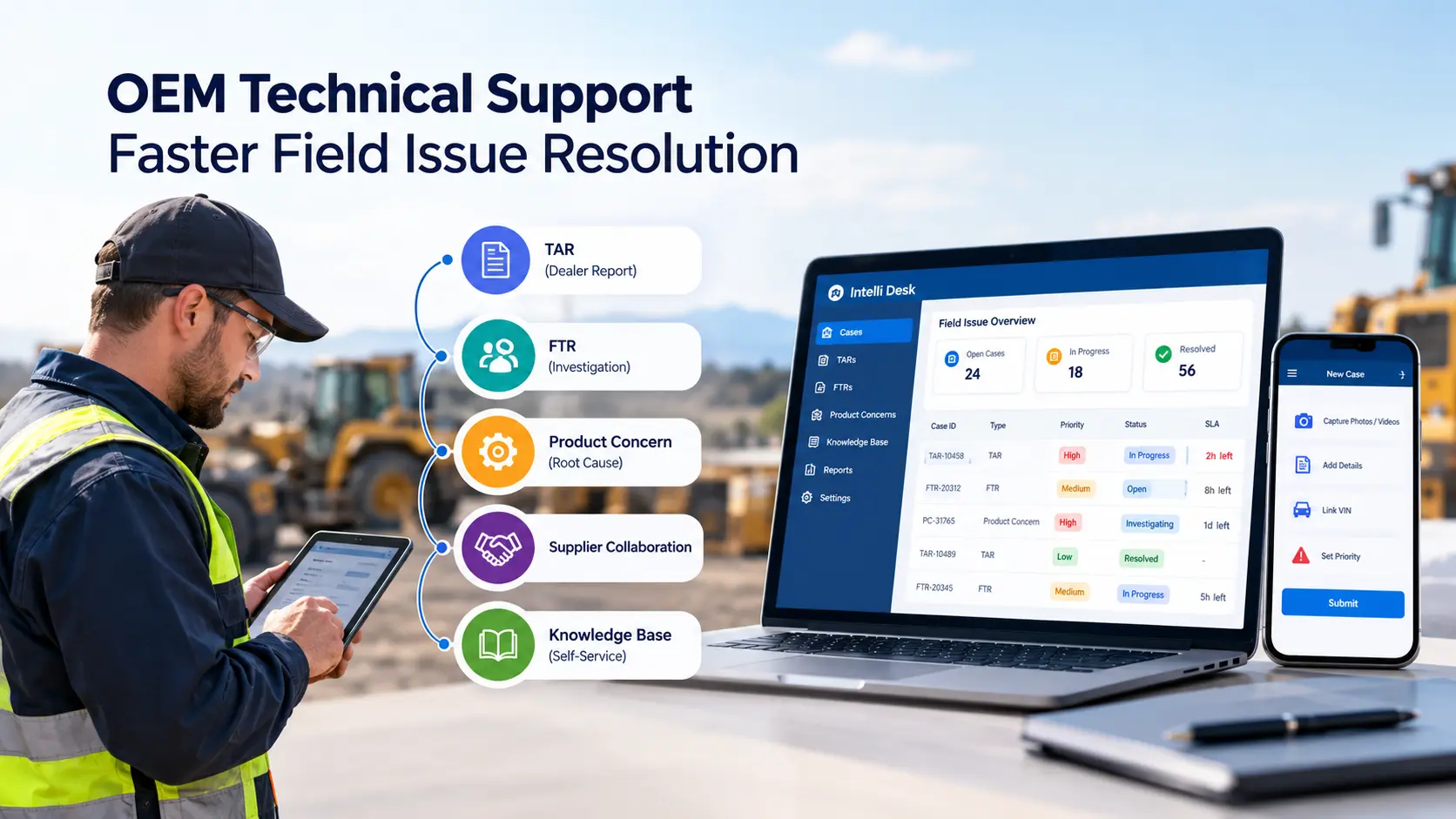
How Does Technical Support Software Improve OEM Field Service Operations?
It improves field service operations by shortening the time from dealer report to answer, cutting duplicate data entry, and giving managers a single view of every open case. Service managers spend less time chasing information and more time solving problems. And dealers get consistent responses across regions.
- Faster resolution: Complete TARs and clear ownership cut the back-and-forth that drags cases out, so dealers get an answer in fewer exchanges.
- Fewer repeat inquiries: The knowledge base answers common questions before they become TARs, allowing managers to focus on more complex cases.
- Less downtime: A unit that is down is a customer who is not buying parts or service from you. Faster answers get it running sooner.
- Lower service and warranty cost: A correct first-time repair means fewer repeat claims, fewer goodwill gestures, and less rework at the dealer.
- Network visibility: Managers can see which regions are backed up, which dealers submit thin TARs, and where cases stall between teams.
How Does Real-Time Field Data Connect Dealers, Technicians, and OEM Teams?
Real-time field data puts the same case in front of the dealer, the service manager, remote specialists, and the back office at once. Everyone works from the current record, so a technician in the field can get an expert answer without waiting for a callback, and the OEM sees the issue as it develops.
- Dealers and service managers work on the same case. There is no separate email thread, so nobody answers from stale information.
- Field technicians and remote specialists share photos, video, and messages on the case. A specialist can see the fault without driving to the site.
- Back-office teams see live case status. They no longer wait for a weekly summary to learn that an issue has been open for ten days.
- Unnecessary travel drops. An expert who can see the problem on a phone screen sometimes does not need to be there, which saves a trip and a day of downtime.
- Field knowledge is captured: What the technician learned on site goes into the case, not just into their memory or a text message.
How Does Technical Support Software Help OEMs Improve Product Quality?
It helps by connecting individual dealer reports into patterns, so engineering and quality teams see recurring failures early. Related TARs become an FTR, an FTR becomes a product concern, and the product concern carries affected units, root cause findings, and corrective action back into design, production, and supplier management.
- Identify recurring failures: The same fault reported by several dealers appears as a pattern rather than as isolated complaints that may seem minor individually.
- Connect multiple dealer reports: Evidence from many units supports a real root cause analysis, rather than a single dealer’s account of a single machine.
- Share findings with suppliers: Documented failure data supports supplier corrective action and cost recovery, which a verbal complaint rarely does.
- Feed field intelligence back to engineering and quality: The people who own the design see what the field sees, while there is still time to change it.
This is where technical support stops being a cost center. Field data is the earliest and most honest product quality signal an OEM has. Most of it is wasted if it lives in inboxes.
How Does Technical Support Software Support Compliance and Quality Assurance?
It supports compliance by forcing consistent, complete technical field reports and keeping a dated audit trail of every action on a case. Standard forms, required fields, and locked history reduce human error and give quality and legal teams a reliable record when regulators, auditors, or suppliers ask what happened.
Good field reports depend on a few basics:
- Standardized formats: Every dealer reports the same way, so cases can be compared and counted without cleanup.
- Data integrity: Observations and measurements are recorded as entered, with a visible history of any later change.
- Documented tests and observations: The case shows what the technician checked and what they found, not only the conclusion.
- Clear recommendations and corrective actions: The report ends with what should happen next and who owns it.
- Internal protocols and regulatory requirements: Your own rules and any external reporting duties are built into the workflow, not left to memory.
- Audit trail: Every action on a case is recorded with who did it and when, which is what auditors and quality teams ask for first.
The usual compliance problems are human, not technical. Two come up most:
- Typing errors in VINs, part numbers, and measurements: One wrong character breaks the link to service history and warranty data.
- Technicians writing notes at the end of a long day: Details get dropped when documentation happens from memory rather than at the unit.
Digital workflows address both. They validate entries, require key fields, keep a single format, and time-stamp every change. When a field issue touches safety or regulatory reporting, the OEM needs a dated record of what it knew and when. A shared inbox cannot provide that.
How Does Technical Support Software Improve Customer Experience?
It improves customer experience by getting the right answer to the dealer faster, so the customer’s vehicle or machine spends less time in the shop and returns less often. The customer never sees the TAR. They see how long the unit was down and whether the problem came back.
- Faster response: Priority and SLA rules put urgent cases first, so a customer with a down unit is not waiting behind a routine question.
- Fewer repeat visits: Better diagnosis leads to correct first-time repairs, which is what customers actually judge a dealer on.
- Quicker parts identification: Linking the case to the parts catalog reduces wrong-part orders and the second trip that follows.
- Clear communication: The dealer can give the customer a real update with a next step, not a guess.
- Proactive updates: When the OEM identifies a pattern, dealers can contact affected owners before more customers are inconvenienced.
What Problems Should OEMs Solve Before Replacing Their Existing FTR System?
Replace your current FTR process when it costs more to maintain than it returns, produces unreliable data, or cannot connect dealers or departments, or cannot scale with your network. If managers cannot see live case status or recurring failures, the process is already limiting the business.
- It is expensive to maintain: Custom spreadsheets, shared mailboxes, and manual reports need constant labor, and that labor does not improve the outcome.
- Manual processes slow growth: Every new dealer or product line adds workload in direct proportion, because nothing is automated.
- You cannot trust the field data: Formats vary, and fields are missing, so any reports built from them need a cleanup pass first.
- Team works in fragmented systems: Service, warranty, parts, and engineering each hold part of the story, and nobody sees all of it.
- KPIs are not improving: Response and resolution time stay flat quarter after quarter, because the process itself is the constraint.
- It will not scale: What worked for twenty dealers fails at two hundred, and adding people is the only fix available.
- Managers cannot see live field activity: They hear about problems after the fact, usually from an upset dealer.
How Do You Choose Technical Support Software for an OEM?
Choose by testing the technical support software against your real dealer workflow, not a feature list. Ask the vendor to run your TAR, a real multi-dealer failure, and your SLA rules in the demo. Then confirm mobile, integration, and reporting, and check whether closed cases become searchable knowledge.
Use the feature list above as your checklist. These six questions separate software that passes a demo from software that holds up in production:
- Does it fit your workflow? Ask whether it can model your dealer, service manager, and back-office roles as they work today, not as a vendor template assumes.
- Can it handle TAR to FTR to product concern in one record, without exports or re-entry between steps?
- Can you configure it yourself? Adding a category, a priority, or a rule should not require paid custom development each time.
- How does it integrate with ERP, warranty, and parts systems? Ask who builds the integration and who maintains it.
- Can it scale? Test it against your dealer network, additional product lines, and new markets without a redesign.
- Can it show a complete audit trail? Every action on a case should carry a name and a timestamp.
Technical Support Software vs. Traditional Field Technical Reporting
Traditional field reporting depends on paper, email, and spreadsheets, so each step needs a person to move information along. Technical support software replaces those handoffs with a structured workflow, where data is entered once, routed by rules, timed automatically, and kept in a central record.
TAR vs. FTR vs. Product Concern: What’s the Difference?
A TAR is one dealer’s reported issue. An FTR consolidates related TARs for a broader investigation. A product concern records a product or component-level problem that needs engineering, quality, or supplier action. Each record covers a wider scope than the one before it.
What KPIs Should OEMs Track in Technical Support?
Track response time, resolution time, SLA compliance, first-time rate, repeat issues, and escalation rate at a minimum. These show how fast dealers get answers, whether the answers work, and where cases stall. Add cost and technician measures once the core numbers are reliable.
For more information, see our guide to key metrics OEMs should track in field issue management.
How Does Intelli Desk Support OEM Technical Support?
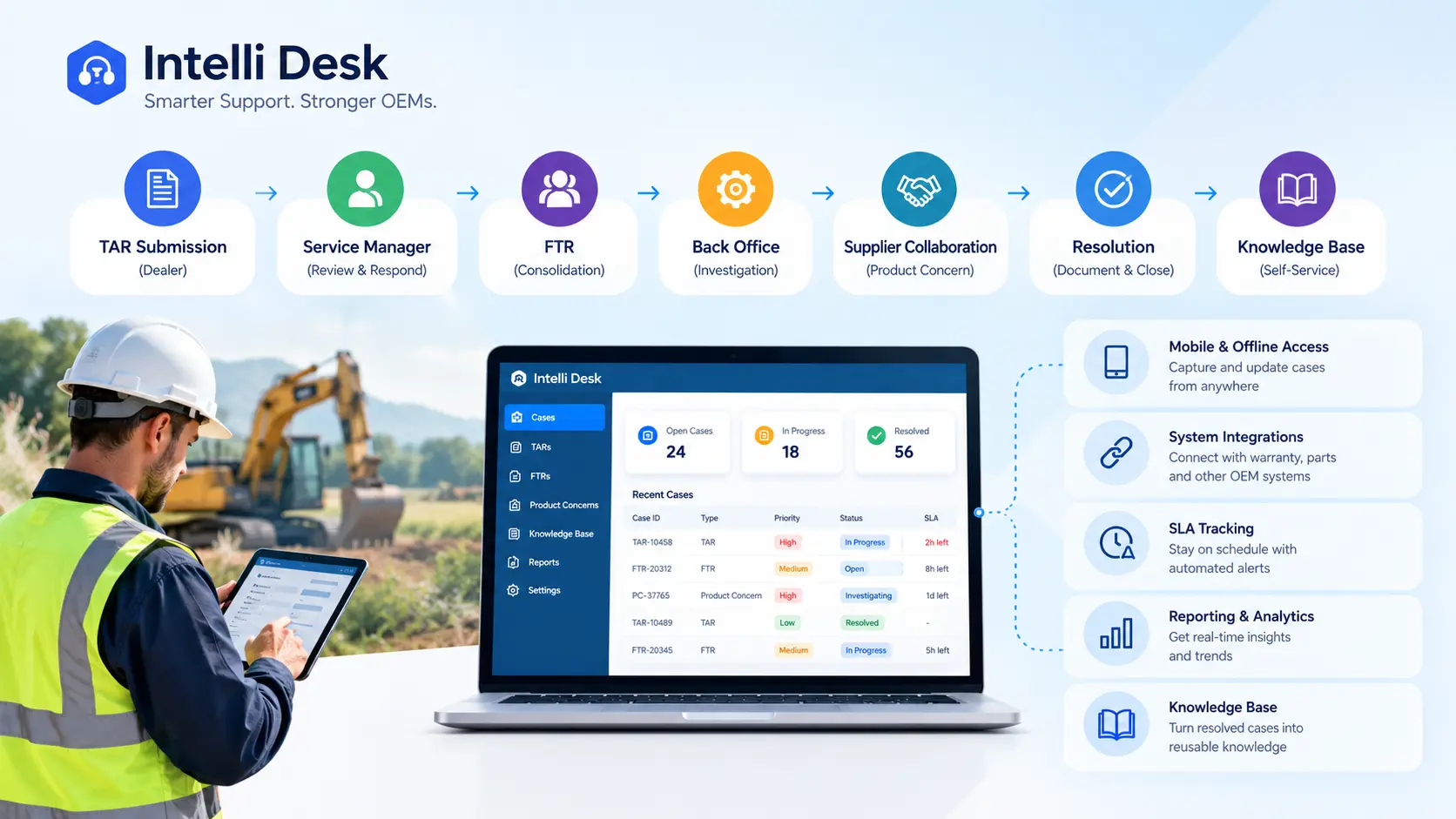
Intelli Desk, a technical support software for OEMs, manages the workflow from dealer TAR submission through FTR consolidation, back-office review, supplier coordination, SLA enforcement, and knowledge base publication, and connects to Intelli Warranty and Intelli Catalog, so that issues, warranty claims, and parts data stay linked rather than living in separate tools.
Dealer TAR submission and VIN-linked capture
Dealers submit TARs with problem details, VIN linkage, media attachments, and a priority classification. Service managers receive routed cases with full context and respond inside the system, not by email.
FTR consolidation
Cases that need escalation are consolidated into an FTR with a single workflow step, so nobody rebuilds the evidence by hand.
SLA and aging management
Administrators configure dynamic SLAs by issue priority, age, and stakeholder. Cases that cross a threshold change color automatically. Turnaround time reports are available at the OEM, regional, or dealer level.
Back-office and supplier collaboration
Back-office teams and suppliers work the consolidated case, and product concern documentation supports quality and supplier discussions.
Knowledge base integration
Selected resolved cases go through a wiki review and are published to the dealer knowledge base. Dealers search it before filing new TARs, which reduces first-level inquiries on recurring issues.
Integration with Intelli Warranty and Intelli Catalog
Field issues, warranty claims, and parts data sit in connected systems. An FTR traced to a supplier component failure can link to warranty claim data, supporting supplier recovery and reducing documentation workload. Likewise, parts data connect to the electronic parts catalog.
Industries That Use OEM Technical Support Software
Any OEM that sells and services through a dealer network can use this workflow. It fits automotive, construction and mining, agriculture, industrial equipment, aerospace, and electric vehicle manufacturers, where dealers report field issues that the manufacturer must investigate, resolve, and learn from.
- Automotive: dealer-reported drivability, electrical, and component failures, where the same issue can appear in several regions at once.
- Construction and mining equipment: hydraulic, engine, and structural issues on machines working in the field, where downtime stops a job site.
- Agriculture and farm equipment: seasonal failures during planting and harvest, where a few days of downtime has a hard cost for the owner.
- Industrial equipment: complex units with long service histories and many configurations, where unit-level records matter.
- Aerospace: strict documentation and traceability requirements, where a complete audit trail is part of the job.
- Electric vehicles: newer platforms where early field patterns matter most, because design changes are still practical.
Conclusion
Technical support software should do more than digitize the field report. It should connect dealer requests, technical assistance, FTR investigation, product concerns, supplier collaboration, resolution, and the knowledge base in one record so each field issue is solved once and the answer is available to every dealer.
Connect dealer TARs, FTR investigations, product concerns, and supplier collaboration in one workflow. Give your service teams the visibility they need to resolve issues faster and identify recurring product failures.
Frequently Asked Questions
What is the difference between a TAR and an FTR?
A TAR is a single dealer-reported issue sent to a service manager for first-level response. An FTR consolidates related TARs into one case for back-office review. The OEM uses an FTR when the service manager cannot resolve the issue with the information available, or when several units across different dealers show the same fault.
How does technical support software help OEMs reduce warranty costs?
Technical support software helps OEMs reduce warranty costs by preventing repeat dealer visits, duplicate claims, and supplier coordination failures. It ensures issues are properly documented, escalated, and investigated at the root cause level. A centralized knowledge base helps dealers resolve known issues independently, while FTR-linked product concern data strengthens supplier recovery cases.
Can technical support software integrate with warranty management systems?
Yes, and the integration matters. Field issues that trace to warranty-eligible failures need to be linked to the warranty claim data to support supplier recovery and to feed failure pattern data into warranty reserve planning. An integrated platform like Intelli Desk, connected with Intelli Warranty, handles this automatically.
What is SLA tracking in OEM technical support software?
SLA tracking monitors response and resolution deadlines for each TAR or FTR based on priority. Automated alerts and color-coded indicators help service managers identify delays, prevent SLA breaches, and improve support efficiency.
How does technical support software reduce repeat issues?
It captures complete case data, escalates patterns to an FTR, supports root cause analysis, and publishes the findings to a dealer knowledge base. Dealers then repair the unit correctly the first time, and known issues get answered by search before they become another TAR or warranty claim.


Explore More Insights




.webp)


About the Author

Nishant Sharma
Nishant Sharma is the Head of Demand Generation at Intellinet Systems, specializing in B2B marketing, sales, digital transformation, and automotive aftermarket solutions. He shares insights on emerging technologies, industry trends, and strategies that help OEMs and businesses improve operational efficiency, customer experience, and aftermarket growth.


