

Overview: An inventory management system for OEMs is software that tracks spare parts stock, location, and movement across plants, warehouses, and dealer networks, and connects that data to the parts catalog and ordering process so the right part is on hand when a dealer or customer needs it. It differs from a general warehouse tool because it must account for part supersessions, multiple sales channels, and thousands of SKUs associated with equipment already in the field.
Key Takeaways:
- An inventory management system for OEMs tracks stock across plants, warehouses, and dealers, then ties it to the parts catalog.
- Generic warehouse software misses OEM-specific problems like part supersessions and installed-base demand.
- Spare parts inventory management usually fails in two directions at once: dead stock in one place, stockouts in another.
- A 2025 industry survey found that, on average, 22 % of MRO inventory has sat unused for more than five years.
- Connecting inventory data to the parts catalog, as Intelli Catalog does, turns inventory management software for manufacturers into something dealers actually use.
Ready to Connect Your OEM Parts Inventory to Your Catalog? Request a Demo
Why Does Generic Warehouse Software Fall Short for OEM Aftermarket Operations?
Generic warehouse software tracks boxes moving in and out of a single facility. It was not built to handle OEM aftermarket needs like part supersessions, multiple sales channels, dealer-level stock visibility, and thousands of SKUs tied to machines already sold and still running in the field.
- A single part may have three or four superseded numbers, all pointing to the same physical item.
- Stock has to be visible, not just at the factory, but at every dealer and distribution point.
- Demand is tied to an aging installed base, not just current production plans.
- One shortage on a common part can stall a repair and cost a customer relationship, not just one sale.
What Are the Signs You Need to Upgrade Your Inventory System?
An OEM does not need a new inventory management system until the signs are already costing money. A few patterns show up before the number on the balance sheet does.
- Dealers call to check stock because the online catalog cannot confirm it.
- The same part gets reordered under two or three different numbers because nobody linked the supersession.
- Warehouse teams run manual stock counts in spreadsheets between system updates.
- A part sits at one dealer for months while another dealer places an emergency order for the same SKU.
- Finance cannot get a straight answer on how much capital is tied up in dead stock.
Any one of these on its own is a minor annoyance. Two or three together usually mean the current system was not built for OEM aftermarket operations in the first place.
What Is An Inventory Management System for OEMs?
An inventory management system for OEMs is a platform that tracks spare parts stock across plants, warehouses, and the dealer network, and ties that stock data to the parts catalog and ordering system. In this guide, the term refers to inventory management built around an OEM's own part numbers, dealers, and installed base, rather than a generic warehouse system.
The practical difference shows up in the details a generic system usually gets wrong:
- Stock is tracked at every tier: plant, regional warehouse, and individual dealer.
- Superseded part numbers roll up into a single, current stock record.
- Reorder points can factor in the installed base of equipment still under warranty or service contract.
- Stock and pricing data feed directly into the same catalog a dealer uses to place the order.
What Are the Core Features of Inventory Management Software for Manufacturers?
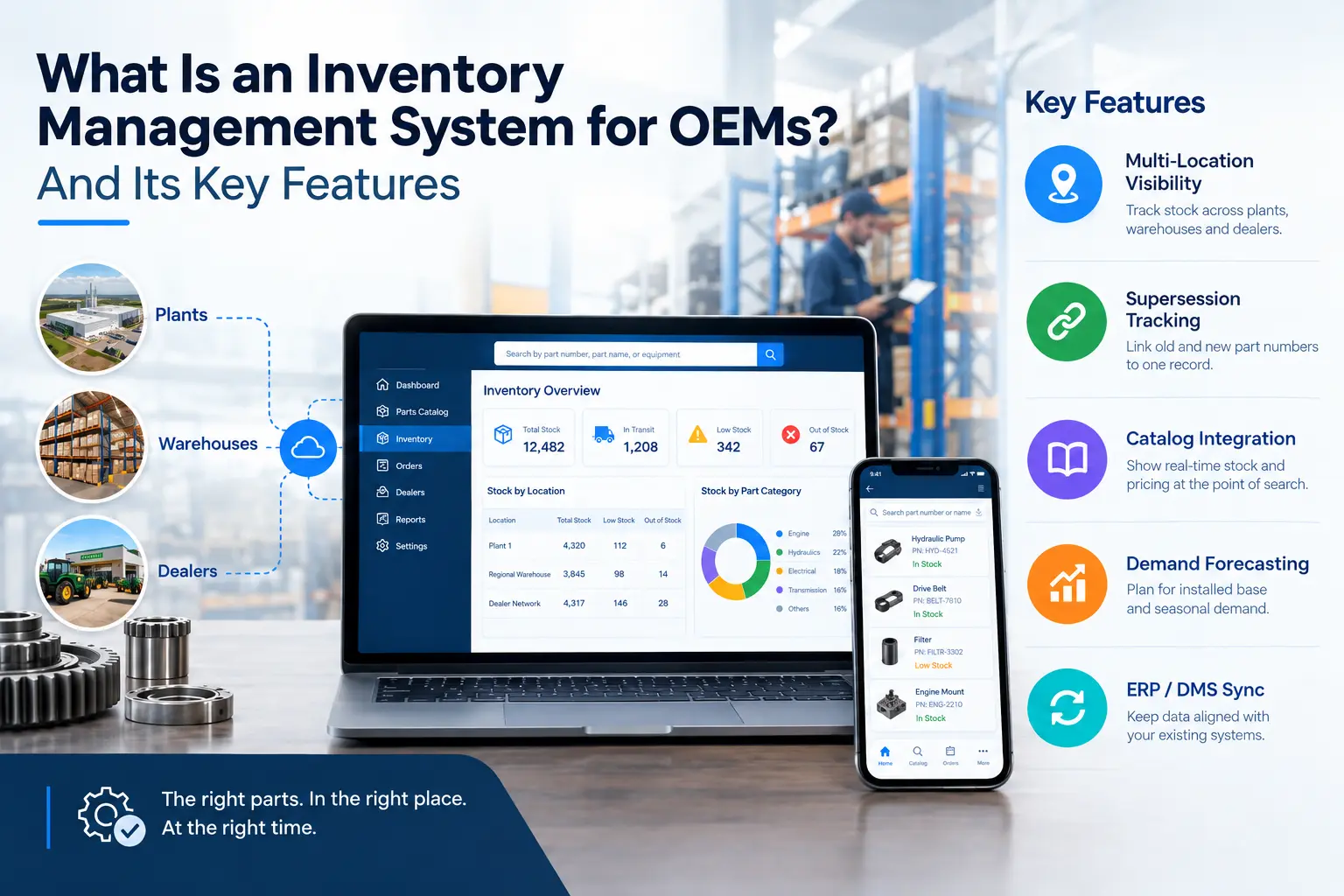
Inventory management software for manufacturers needs a few specific capabilities: multi-location stock visibility, supersession tracking, catalog integration, demand forecasting tied to the installed base, and two-way sync with ERP or DMS systems. Without these, OEMs end up running inventory decisions on spreadsheets next to the software they paid for.
- Multi-location visibility: stock counts across plants, warehouses, and dealers in one view.
- Supersession-aware tracking: old and new part numbers link to the same inventory record.
- Catalog integration: stock and pricing appear right where a dealer searches for the part.
- Demand forecasting: ordering patterns tied to the installed base, not just past sales history.
- ERP or DMS sync: orders, dispatch, and stock updates flow both ways automatically.
How to Choose the Right Inventory Management System for OEMs?
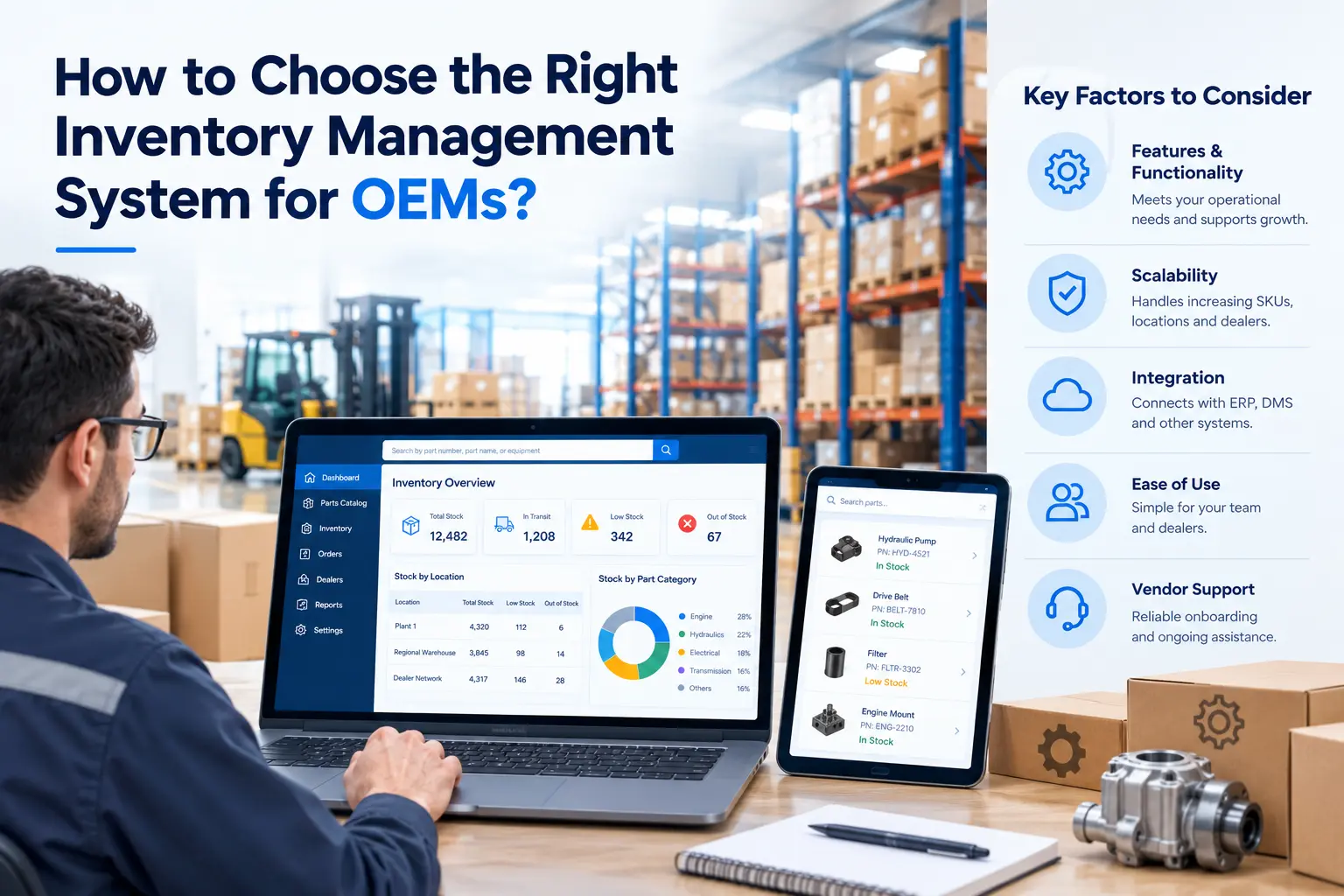
Choosing a system for OEM aftermarket parts is not the same as choosing a general ERP module. A few questions narrow the field quickly.
- Does it track superseded part numbers as one stock record, or does it treat each number as a separate SKU?
- Can a dealer see live stock and pricing at the same screen where they search the catalog, or is that a separate lookup?
- Does it support multi-tier visibility across plants, regional warehouses, and individual dealers?
- Can it sync both directions with the existing ERP or DMS, or does it require manual re-entry on either side?
- Does the vendor have experience with OEM aftermarket operations specifically, or is this a generic warehouse tool being repositioned?
A system that cannot answer these clearly in a demo is not built for this job, no matter how polished the interface looks.
Where Do Most OEMs Lose Money on Spare Parts Inventory Management?
Spare parts inventory management usually goes wrong in two directions at once: money tied up in slow-moving stock, and lost sales when a common part is not on the shelf. Most OEMs carry both problems at the same time, in different warehouses, without a clear way to see either one.
A 2025 survey of 300 manufacturing executives by Sparetech found that, on average, 22% of MRO inventory has gone unused for more than five years. Some of that is deliberate insurance stock held for critical equipment, but a large share of it is simply capital sitting on a shelf with no active demand behind it.
- No link between the parts catalog and current stock levels, so orders get placed on guesswork.
- Supersession history not tracked, so old part numbers get reordered even after a replacement exists.
- Dealer-level stock is invisible to the OEM, so a part gets restocked at one location while it sits idle at another.
What Steps Can OEMs Take to Cut Stockouts and Dead Stock?
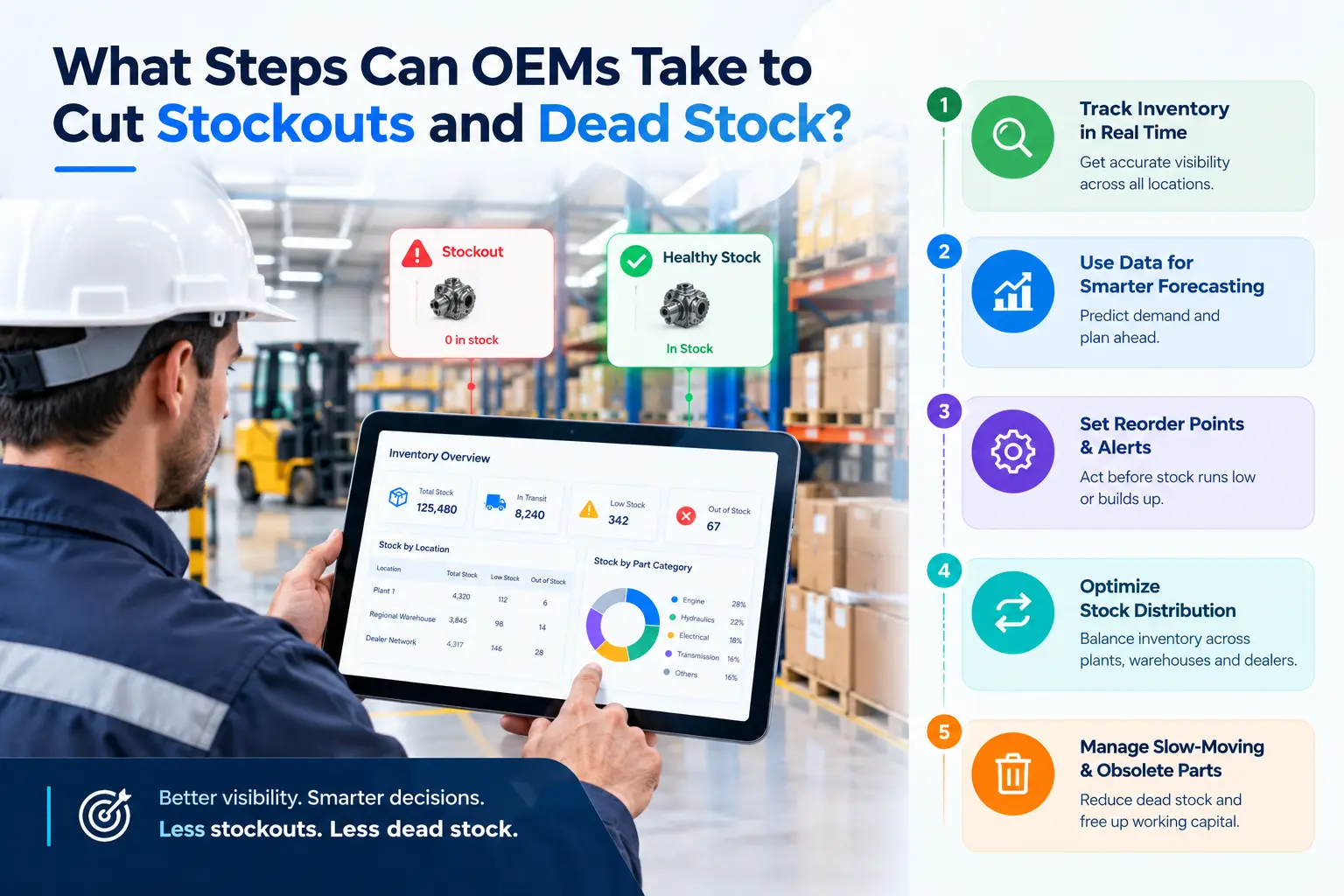
Fixing both problems at once takes a specific order of operations, not a single software switch.
- Audit current stock against the parts catalog to find where supersessions have split one part into multiple SKUs.
- Set reorder points using installed-base data rather than past sales history alone, since demand for aging equipment does not follow the same curve as new products.
- Connect stock and pricing data to the same catalog dealers already search, so availability shows up at the point of order rather than requiring a separate check.
- Flag slow-moving stock older than a set threshold, such as 12 or 24 months, for review rather than letting it sit indefinitely.
- Sync the system with the ERP or DMS in both directions so dispatch and stock updates do not require manual entry.
- Review dealer-level stock data on a set schedule to catch the pattern of one location overstocked while another runs short.
None of these steps require replacing the ERP. They require the layer that connects inventory data to the catalog, which is usually the piece missing.
How Does an Inventory Management System for OEMs Compare With a Traditional ERP-Only Setup?
A traditional ERP tracks financial and production data well, but treats spare parts like any other SKU. An inventory management system for OEMs adds the aftermarket-specific layer on top: catalog links, supersession history, and dealer-level visibility, so the numbers reflect what is actually happening with parts in the field.
What Are the Benefits of an Inventory Management System for OEMs?
The case for this layer comes down to two numbers already cited above, put side by side.
- Cutting into that 22% of MRO inventory sitting unused for more than five years frees up capital that is otherwise doing nothing.
- Fewer misorders from unclear supersession history means fewer wasted shipments and fewer frustrated dealers.
- Dealer-level visibility means restocking decisions are based on where the part is actually needed, not on which warehouse happens to have easy access to the ERP.
Put together, this is less about adding software and more about protecting margin on business the OEM has already won.
How Does Intelli Catalog Support Aftermarket Inventory Management?
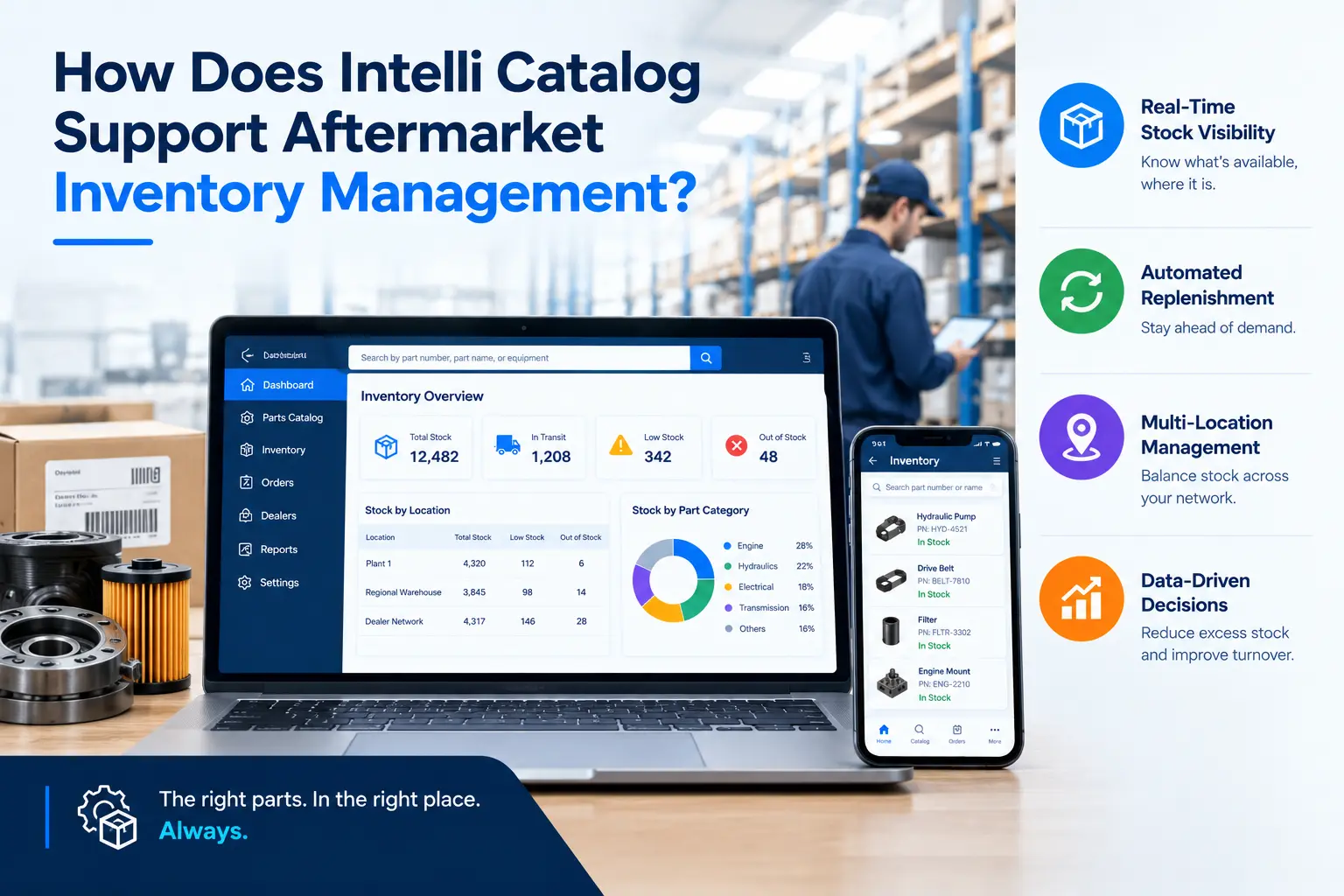
Intelli Catalog connects the parts catalog dealers search every day to the stock and order data behind it, so aftermarket inventory management is not a separate system dealers have to check. It shows part availability at the point of search and syncs orders back to the OEM’s ERP or DMS.
- Order Management and Tracking: dealers place and monitor orders without leaving the catalog screen.
- Effortless Part Supersession Management: order submission and dispatch details sync back automatically.
- Cloud-based admin panel: dealers can define pricing rules and manage order fulfillment in one place.
- B2B, B2B2C, and B2C offerings: inventory and ordering data flow correctly whether the buyer is a dealer, a retailer, or an end customer.
Aftermarket services carry real weight on the balance sheet. McKinsey’s analysis across 30 industries found an average EBIT margin of 25% for aftermarket services, compared to 10% for new equipment sales.
Conclusion
Most OEMs already have an ERP, and most already have a parts catalog. What is usually missing is the layer that connects the two: an inventory management system for OEMs that tracks stock across plants and dealers, follows parts through supersessions, and shows availability at the exact point where a dealer is searching. Spare parts inventory management done this way cuts both dead stock and stockouts at the same time, rather than trading one problem for the other. Given how much of an OEM's profit runs through aftermarket parts, closing that gap is not a minor operational fix. It is one of the more direct ways to protect margin on business that is already won.
Book a live demo of Intelli Catalog and see how catalog-linked inventory data, supersession management, and ERP or DMS integration work together to keep your dealer network stocked with the right parts.
Frequently Asked Questions
What is an inventory management system for OEMs?
It is software that tracks spare parts stock across plants, warehouses, and dealers, and connects that data to the parts catalog and ordering process. Unlike generic warehouse tools, it accounts for part supersessions, multiple sales channels, and demand tied to equipment already in the field.
How is spare parts inventory management different from regular warehouse inventory?
Regular warehouse inventory tracks stock moving through one facility. Spare parts inventory management has to track the same part across plants and dealers, follow it through supersessions, and connect stock levels to an aging installed base rather than just current sales orders.
Can inventory management software for manufacturers integrate with our existing ERP?
Yes, in most cases. Platforms built for OEM aftermarket operations, such as Intelli Catalog, are designed for two-way sync with ERP and DMS systems, so order submissions, dispatch updates, and stock levels stay consistent without manual re-entry.
How does aftermarket inventory management affect dealer relationships?
When dealers cannot get stock or availability answers quickly, they either delay the repair or source the part elsewhere. Accurate, catalog-linked inventory data lets dealers confirm availability at the point of search, which reduces misorders and keeps parts business inside the OEM's own channel.


Explore More Insights





.webp)


About the Author


Nishant Sharma
Nishant Sharma is the Head of Demand Generation at Intellinet Systems, specializing in B2B marketing, sales, digital transformation, and automotive aftermarket solutions. He shares insights on emerging technologies, industry trends, and strategies that help OEMs and businesses improve operational efficiency, customer experience, and aftermarket growth.


