

Overview: Vehicle service appointment management is the process of capturing, scheduling, confirming, and preparing for customer service visits. For OEM dealer networks, the value goes beyond booking a time slot: appointment information needs to connect with job cards, workshop planning, parts, billing, and service history. Intelli DMS brings these dealer service processes into a connected workflow, helping OEMs establish greater consistency and visibility across their network.
Key Takeaways
- What it is: vehicle service appointment management covers booking, scheduling, confirmation, and preparation for a customer’s service visit.
- Where problems arise: disconnected scheduling can create duplicate data entry, scheduling conflicts, limited workshop visibility, and gaps between appointments and job cards.
- Why it matters: aftersales operations account for 70 to 80% of dealer group operating profit, according to Pied Piper's 2026 Service Scheduling Effectiveness research.
- What to look for: a dealer service solution should connect appointment scheduling with workshop, job card, parts, billing, and reporting processes.
- Where Intelli DMS fits: Intelli DMS connects appointment management with broader dealer service operations, giving dealers and OEM teams a more structured service workflow.
Connect service bookings, customer check-in, job cards, technician assignments, parts, billing, and service history in one platform. Book a Demo
Vehicle service appointment management determines whether a customer's visit to the workshop starts on time and on plan, or starts with a service advisor hunting for an open bay and a technician who was never told what parts to pull. For dealerships running any real service volume, this is not a minor scheduling detail. It is the first operational decision in the service visit, and it can shape what happens downstream: how long the customer waits, whether the right parts are on hand, and how smoothly the technician can start the job once the vehicle is checked in.
What Is Vehicle Service Appointment Management, Exactly?
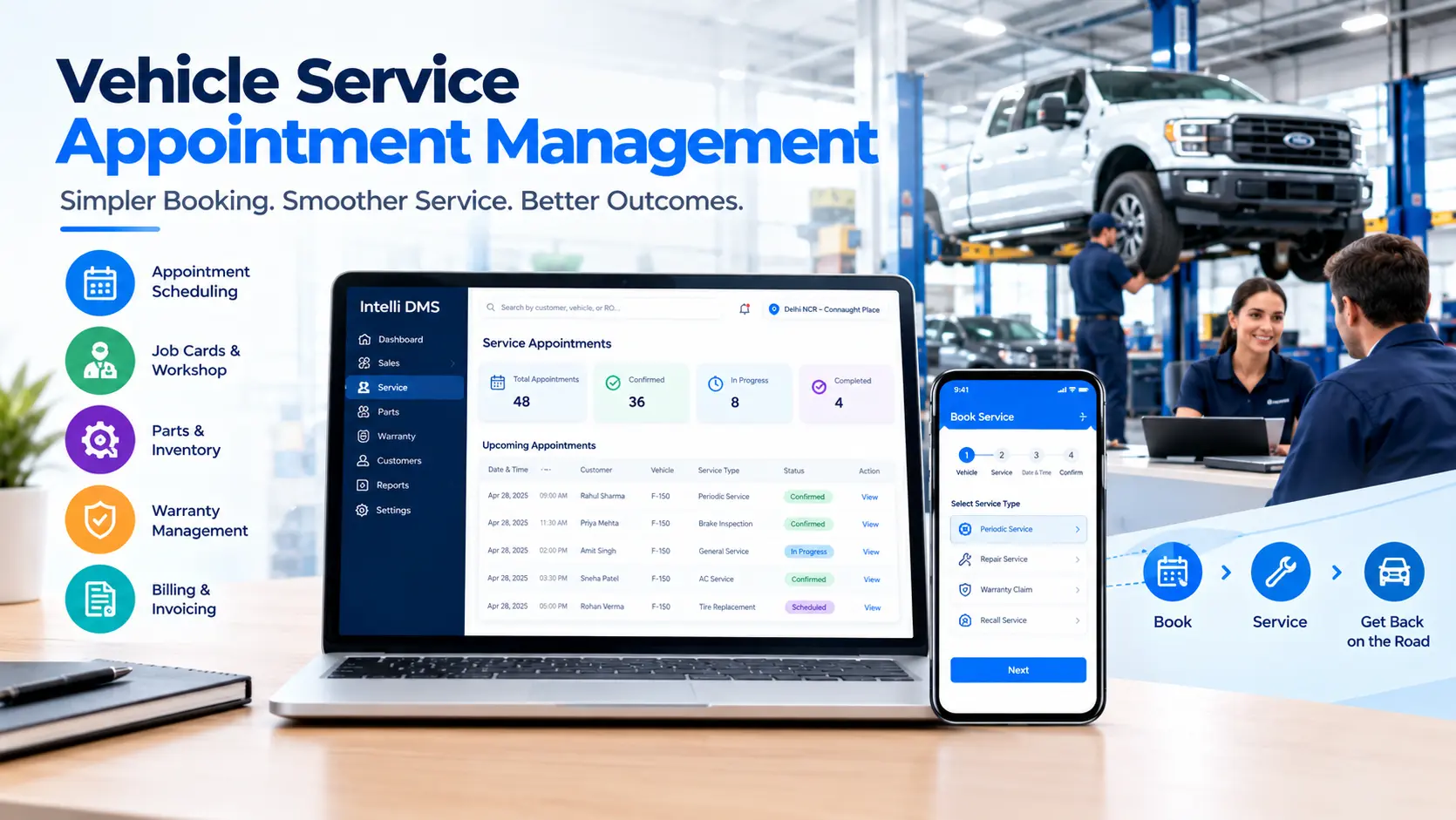
Vehicle service appointment management is the process of capturing, scheduling, confirming, and tracking a customer’s service visit from the moment they request a slot to the moment the vehicle is checked in. Done well, it connects scheduling with job card creation, parts availability, and technician assignment rather than treating booking as a standalone task.
A connected system helps dealers manage vehicle service appointments without rebuilding customer, vehicle, and service information when the vehicle arrives.
In many dealerships, only the first two parts of that definition happen with much consistency: someone takes the request, and someone writes down a time. What happens after that, including parts planning, technician allocation, and the job card itself, is often rebuilt when the customer walks in. A more complete approach to managing vehicle service appointments would typically cover:
- Capturing the request, whether it comes by phone, website, walk-in, or a service due reminder
- Confirming a specific date, time, and bay, not just a day
- Recording what the visit is for: periodic service, warranty, recall, or a specific complaint
- Flagging the parts the job is likely to need, based on the service type
- Assigning or at least earmarking a technician with the right skill set
- Sending reminders and confirmations ahead of the visit
Within a broader dealer management system, vehicle service appointment management functions as the scheduling capability that feeds job card creation and workshop planning, and reporting, rather than working as a standalone tool.
Why Can Manual Vehicle Service Scheduling Break Down at Scale?
Manual scheduling becomes harder to manage once a workshop runs more than a handful of bays and technicians, because a paper register or spreadsheet cannot easily show current bay and technician availability. This can lead to double-booked slots, appointments confirmed without checking parts stock, and job cards built from scratch while the customer waits at the counter.
This tends to be a bigger issue at higher-volume dealers, since more advisors are booking against the same limited bay and technician without a shared view of each other’s schedules.
According to Pied Piper's 2026 Service Scheduling Effectiveness research, aftersales operations account for 70 to 80% of dealer group operating profit. That makes service scheduling an important operational consideration for dealer groups to focus on protecting aftersales performance.
How Does Intelli DMS Connect Vehicle Service Appointment Management With Dealer Operations?
Intelli DMS connects service appointment management with the broader dealer service workflow, linking appointment information with front-office and job card processes to reduce duplicate data entry and improve service coordination. The Appointment Management module supports online and walk-in bookings, scheduling, reminders, and slot planning within the same platform used for job cards, workshop management, and billing.
For a service advisor working inside a connected platform, this can reduce the need to ask a customer to repeat information already captured at booking, since appointment, customer, and vehicle details sit within the same system used to build the job card.
- Online and walk-in appointments are captured in the same calendar, so scheduling does not rely on separate systems for each booking channel
- Slot planning is intended to support scheduling decisions around appointment timing, rather than only showing an open slot on a grid
- Reminders are built into the Appointment Management module to help keep customers informed ahead of the scheduled visit
- Front Office Management, used for customer check-in, sits within the same platform as appointment and job card data.
What Does the Connected Workflow Look Like From Booking to Delivery?
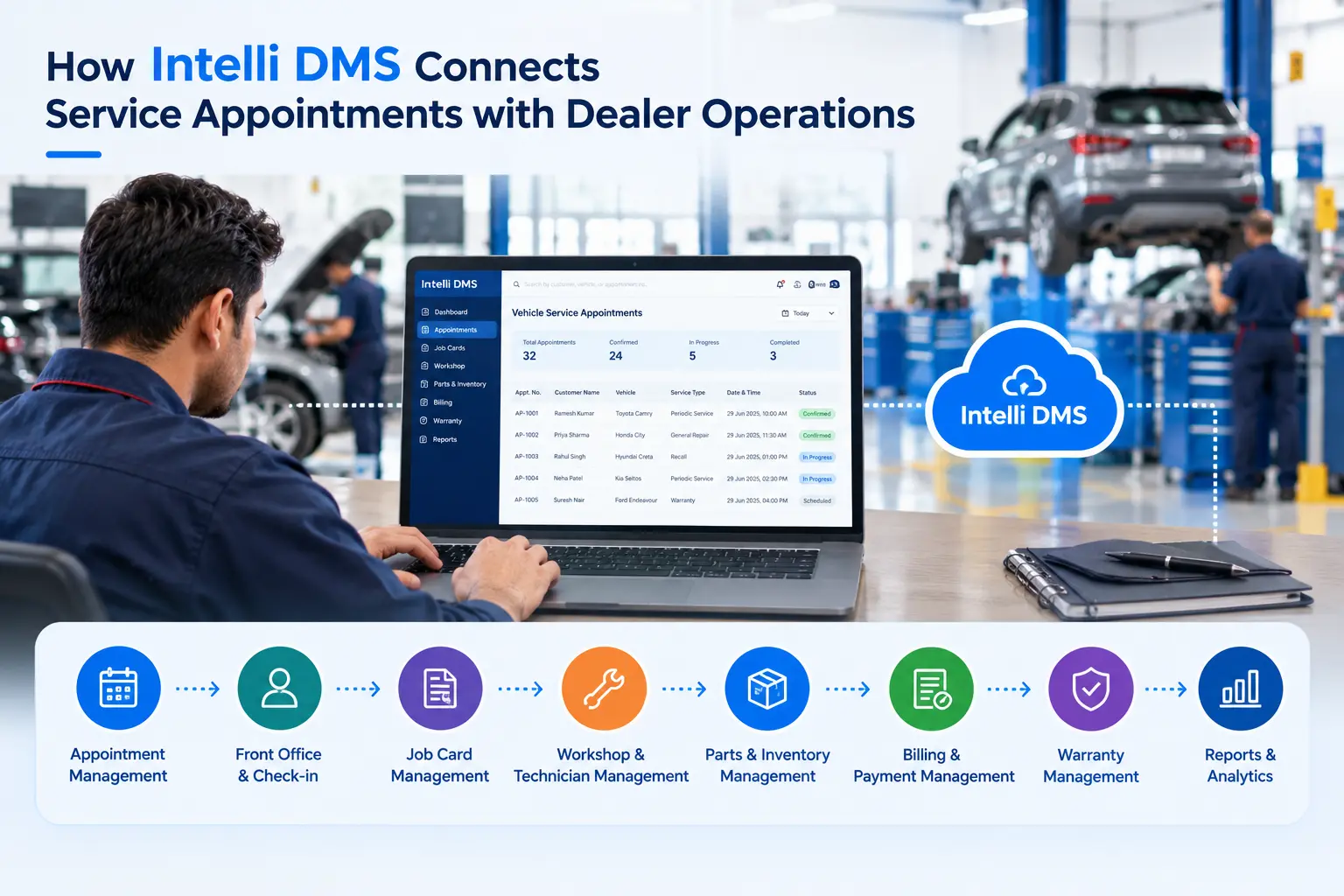
A vehicle service appointment should not end when the booking is confirmed. In a connected DMS, the appointment becomes the starting point for the rest of the service workflow. Intelli DMS connects appointment management with front-office, job card, workshop, parts, billing, and service history processes.
Intelli DMS is structured so vehicle service appointment management is part of one continuous workflow rather than a series of disconnected steps. A booking flows toward check-in, a job card, workshop assignment, parts, and billing, with these modules sitting within the same platform rather than as separate systems requiring repeated data entry.
- An appointment booked online, by phone, or as a walk-in is captured through Appointment Management with the date, time, and service type
- Customer check-in and vehicle reception are handled through Front Office Management, including any inspection notes from the service advisor
- Job Card Management is used to create and track the job card for the visit, keeping service requests and work progress within the same platform as the appointment record
- Workshop & Technician Management is used to assign jobs based on technician skills and monitor repair progress against the job card
- Parts & Inventory Management is used to manage spare parts and inventory availability, and part requests tied to the job card
- Billing & Payment Management is used to generate the invoice for the completed job card, with taxes, discounts, and payments managed in the same platform
- Customer & Service History Management is used to record the completed visit as part of the vehicle’s service history and manage follow-ups
Compare that to a phone-and-paper process, where the same information is often written down, then re-typed, explained again to a technician, then tracked down again at billing. Each handoff is a point where information can be delayed or lost.
Why Do Both Online and Phone Scheduling Still Matter for a Dealer Network?
Phone and online channels serve different purposes for service customers. According to Pied Piper’s 2026 Service Scheduling Effectiveness study, approximately two-thirds of service customers still prefer to schedule appointments by telephone, while online scheduling continues to grow.
Phone tends to work better for complex or urgent needs where a customer wants to talk through the problem, while online scheduling can suit customers who prefer to book a routine service visit without a call. A dealer service platform that manages both channels within the same calendar avoids treating one as a separate, disconnected system from the other.
This is why keeping online and walk-in appointments within one Appointment Management calendar, rather than as two separate systems, is a reasonable design goal for a connected DMS. A customer who prefers to call and one who books online can both be scheduled against the same bay and technician view.
Business Impact: What Can Change When Vehicle Service Appointment Management Is Connected?
With Intelli DMS, vehicle service appointment management is part of a connected dealer service workflow that brings appointment booking, customer check-in, job cards, workshop and technician management, parts, billing, service history, and reporting into one platform. This helps dealers prepare for scheduled work, coordinate resources, and reduce unnecessary handoffs between booking and vehicle check-in. For OEMs, Intelli DMS also provides visibility into appointment and service performance across the dealer network.
The goal is to streamline vehicle service appointments from the initial booking through check-in, job card creation, workshop execution, billing, and service history.
- Better preparation for scheduled work: Intelli DMS connects appointment details with job cards, technician assignment, and parts requirements, helping dealers prepare before the vehicle arrives.
- Fewer redundant handoffs: Customer, vehicle, and appointment information can flow into the service workflow, reducing repeated data entry between booking, check-in, and job card creation.
- More coordinated workshop operations: Intelli DMS connects service advisors, technicians, workshop activities, and parts within the same dealer service workflow.
- Better service continuity: Customer, vehicle, complaint, job, parts, billing, and service history information remain connected throughout the service process.
- Greater OEM network visibility: Intelli DMS brings dealer service data into Reports & Analytics Management, helping OEM teams monitor appointment and service performance across the network.
What Does a Connected Approach Look Like With Intelli DMS?
The table below compares a disconnected scheduling approach with how Intelli DMS structures the same service requirements within one platform. It is meant as a reference for what to look for when evaluating a dealer service system, not a claim that every dealer experiences every listed problem today.
Conclusion
Vehicle service appointment management is not a scheduling nicety. It is the operational starting point for every service visit, and how a dealer handles it can influence bay utilization, technician coordination, and how the customer feels about the visit before a wrench ever touches the vehicle.
Intelli DMS connects the appointment, the job card, the technician assignment, and the parts request within one platform, supporting a dealer network that runs on more structured data rather than a mix of phone calls, paper, and memory. For OEMs evaluating dealer service booking systems, that connection between scheduling and execution is the detail worth testing before signing anything.
Book a demo to see how Intelli DMS handles vehicle service appointments across your dealer network, from the first booked slot to the completed job card.
FAQs
What is vehicle service appointment management?
Vehicle service appointment management is the process dealers use to capture, confirm, and prepare for a customer’s service visit, covering scheduling, technician assignment, and parts visibility. Handled well, it connects a booking to a job card rather than leaving the advisor to rebuild that record from scratch at check-in.
How can dealerships reduce scheduling conflicts for service appointments?
A shared calendar that shows current bay and technician availability across booking channels helps prevent the double bookings that create scheduling conflicts. Pairing that with reminders ahead of the visit also supports better attendance, since missed calls or forgotten texts are a common cause of no-shows.
Does Intelli DMS support both online and phone appointment booking?
Yes. Intelli DMS’s Appointment Management module supports online and walk-in appointments, scheduling, reminders, and slot planning within one platform, so phone and online bookings are managed within the same system rather than two disconnected systems.
How is appointment management connected to the job card in Intelli DMS?
Intelli DMS keeps appointment, customer, and vehicle information within the same platform used for Job Card Management, reducing the need for a service advisor to re-enter the same details a customer already provided at booking.


Explore More Insights






.webp)


About the Author


Nishant Sharma
Nishant Sharma is the Head of Demand Generation at Intellinet Systems, specializing in B2B marketing, sales, digital transformation, and automotive aftermarket solutions. He shares insights on emerging technologies, industry trends, and strategies that help OEMs and businesses improve operational efficiency, customer experience, and aftermarket growth.


