

Overview: Illustrated parts catalog software helps transform the CAD and BOM data into digital catalogs that are interactive and help OEMs with simplification of spare parts identification, improve data accuracy, and ultimately improve aftermarket operations. By strategically connecting technical illustration data with parts information data, solutions like Intelli Catalog can help OEMs increase efficiency by streamlining parts identification to parts ordering in a single digital environment.

Key Takeaways:
- The foundation of an illustrated parts catalog is formed by the combination of CAD and BOM data. CAD files provide the illustrations and BOM establishes the component identities, quantities, and the relationship of a component with the assembly.
- Spare parts identification is simplified through interactive catalogs. Illustrations that are clickable help dealers and technicians identify parts easily without relying on manual processes.
- To ensure catalog reliability, accurate data is essential. Correct part numbers, mapped components, applicability of product, and replacement part relationships enable users to identify the appropriate spare parts.
- An Interactive parts catalog offers more than just digital documentation. These interactive catalogs connect illustrations with searchable product information and supported ordering workflows.
- Aftermarket efficiency is improved with integration. Catalog software is integrated with ERP, dealer management software, inventory and order management software to create a coordinated parts identification and ordering process.
- Intelli Catalog offers transformation of aftermarket operations. Intellinet Systems offers a digital catalog system that offers a modernised solution to OEMs for parts identification and providing dealers with more accessible product information.
Introduction
In modern manufacturing, businesses face increasing pressure to deliver aftermarket services and products faster, improve aftermarket support, increase spare-part availability, and ensure accurate information across dealer and service networks. OEMs face these pressures well beyond their scope of manufacturing high-quality products for the dealer and supplier networks.
While we see expanding pro portfolios, the OEMs must also compensate for the increase in the complexity of spare parts. A single stand-alone machine could easily consist of thousands of components, variations of models, and also consist of multiple assemblies. As a standard practice in manufacturing, each unique component could have a unique part number, details and technical specifications, a history of replacements, and if there are any additional notes about compatibility. When all of these pieces of information are scattered across multiple engineering drawings, technical data sheets, product manuals, and multiple enterprise systems working across departments and teams, it poses a huge challenge to find the right information at the right time. Even a single piece of information about a part of technical detail could take hours, and even then, sometimes, there could be an error.
At this exact point in time, the importance of an Illustrated Spare Parts catalog becomes utmost important.
An illustrated spare parts catalog (IPC) has the capability of transforming engineering information, otherwise complex, into an extremely structured, visually appealing structure that makes it easy for users to understand the placement of parts and components in the larger assembly. When the illustrated parts catalog is developed along with computer-aided design (CAD) files and bills of materials (BOMs), the efficiency of the catalog is increased even more. It gives a more efficient way to organise, publish and maintain the information of spare parts, thereby making identification of parts easier - saving time and effort.
Now that this step is done, let’s take it a notch further. An IPC enables users to click on individual components within a technical illustration to retrieve the part details, cross-verify the applicability of the parts, and even add the parts to the cart and proceed with the ordering process. All of this is combined together in a single digital interface, making the process simpler than before.
OEMs today need to modernise their aftermarket operations by strategically combining CAD and BOM data with interactive catalog technology to not only improve the identification of parts but also streamline their entire workflows. This process proceeds to establish a consistent source of product information and implements a better aftermarket function for the dealers and suppliers.
This detailed guide will help you to learn more about what an illustrated parts catalog is and how it converts CAD and BOM data into an interactive, single-interface platform for parts identification to parts ordering. Here we will also talk about the essential features to look for in an IPC and how it enables OEMs to adopt this technology to streamline and improve their aftermarket performance.
What is an Illustrated Parts Catalog (IPC)?

Imagine a single, structured digital platform that presents all the components of a product through technical illustrations, exploded views of parts and components, details about part numbers, their applicability, technical descriptions, history of changes or upgrades/improvements, and other essential information. This is exactly what an illustrated parts catalog is! Amazing, isn’t it?
This enables users to visually identify individual spare parts rather than looking for this information in multiple places or relying on written information entirely. An IPC saves time, as users do not need to manually look for information by searching through lengthy part lists or descriptions. They get the exact parts they need without any delays or errors.
To understand this in a real example, let's consider a manufacturer producing industrial generators. Now, a generator typically will have thousands of parts, scattered across multiple assemblies. It will have an engine, a cooling system, a fuel system, an electrical system, and a control panel to control all these individual systems. Each of these assemblies will comprise multiple components, which could have similar names or different ones, and also have similar or different spare parts. To understand the components and parts used, there has to be an illustration provided. Manual illustrations will have diagrams which are printed and presented in a two-dimensional format. Sometimes, there can be printing errors or a challenge in understanding a 2D-format picture. A technician or the user would have to be adept with the technicalities of the industrial generator to understand and identify the problem.
An illustrated parts catalog will, on the other hand, organise all of this information into logical sections. If, for example, a technician is troubleshooting a fuel system failure, he would just need to go to that section and look at the entire assembly and the components used and would be able to easily identify which part is at fault and needs repair or replacement. The corresponding item can be easily found in the exploded view of the parts, and identification of the part number becomes easy and saves time for the technician.
What are the features of the Illustrated Parts Catalog (IPC)?
A well-structured IPC would have the following features:
- Technical Illustrations: These technical illustrations would be drawings or exploded views of the components, which show the arrangement of parts in that particular component.
- Part Numbers: These are unique identification numbers for each part used in the assembly, and these can also be used to distinguish individual components.
- Part Descriptions: Each part would have to be described, and the part descriptions contain the names and specifications that explain what that specific component is.
- Bill of Materials data: This provides the information about the components and their relationship within an assembly.
- Applicability Information: It gives details about the variant or a particular model that uses a specific part. Some variants of the same model can use a different part number as part of an upgrade.
- Quantity Information: This gives details about the number of parts/compnents that are required for a particular assembly in a product.
- Supersession Information: This sheds light on the information about any superseded parts or indicates a history associated with that particular part in an assembly.
- Ordering Information: This provides all the relevant information about the commercial details and links to ordering workflows depending on the catalog system
Traditionally, IPCs were distributed manually. They would either be in the form of printed documents or PDFs. While they can still be useful, they become a challenge when there is a supersession or update in part numbers. This would require OEMs to dedicate time and resources to rework or redesign the manual documents and share them with their suppliers and dealers.
Modern IPCs, on the other hand, are digital platforms that transform the manual IPC into a searchable document with illustrated assembly diagrams, exact part information and all other relevant details about the parts and the assembly. This digital platform enables users to navigate product structures, identify and select components, and retrieve all the associated information more efficiently while saving time and resources.
What Is an Interactive Parts Catalog?
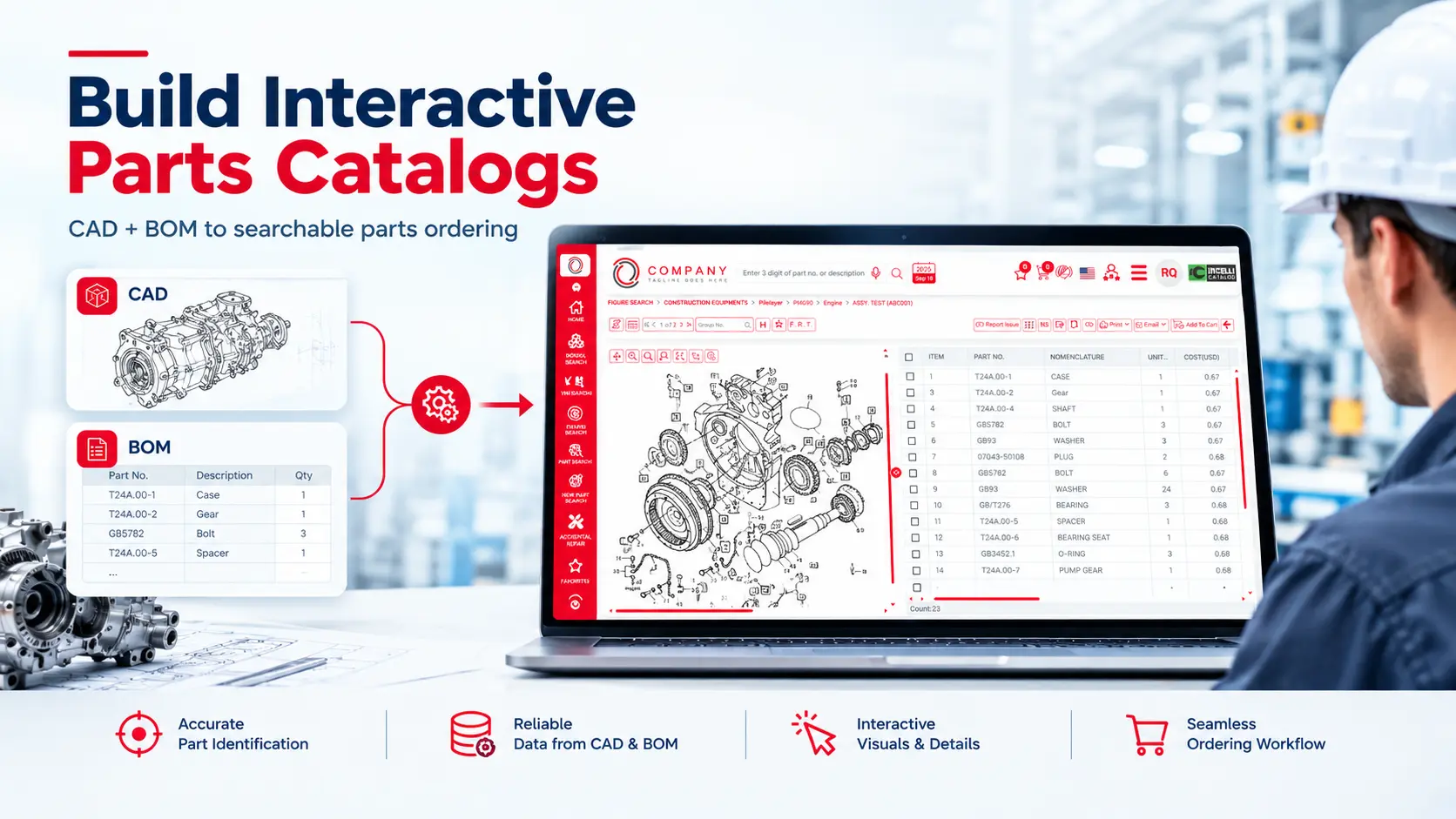
A digital catalog that allows users to engage and interact directly with product illustrations through exploded views and shows all linked component information is known as an interactive parts catalog.
This is very different from a manual catalog where information has to be searched within a document. Users have to locate the part numbers and also need to do a cross-reference against a parts list that is separate. This requires a lot of time and effort and may, at times, result in errors happening with part numbers or part information. An interactive catalog connects it all to one single interface and shows the visual representation of a component with all of its underlying data such as technical information, part details, supersession information, updates, etc.
Let's consider a dealer who is looking for a replacement fuel pump. The dealer can open an exploded view of a generator’s fuel system and select the fuel pump from the interactive illustration. The interactive catalog then displays all information, such as the corresponding part number, part description, quantity that is required (or MOQ), information about compatibility (with models or variants), and other relevant details. That does save several hours of time for the dealer, and he can even proceed to add these parts to the cart and order them directly from the system itself! That does bring a huge revolution in the aftermarket process and even improves a dealer’s efficiency!.
The following are the main characteristics of an interactive parts catalog:
- Clickable Illustrations and Hotspots: When looking at a component in an exploded view, individual components within a diagram are associated with the part records. When the user selects one component from the diagram, it highlights the part on the diagram and also displays all the relevant information.
- Searchable Product Information: Let's assume that a user wants to search using the part number directly. When searching using the part number, the results show the description, models in which this part is used, diagrams where this part is present, and other supported parameters with the search option.
- Structured Product Navigation: All the components in the interactive parts catalog are arranged in a very logical manner. These are organised by the product family, model (variant), system, assembly, and sub-assembly, thereby making even super complex products easy to navigate.
- Connected Ordering Workflow: For a parts catalog that incorporates such a deep level of interaction and information, it becomes essential to connect it with the enterprise systems to have a connected workflow. When connected with ERP systems, inventory data, and order management systems, this catalog becomes a powerhouse which can help users with a connected experience from part identification to parts ordering within this one system.
- Centralised Catalog Maintenance: When a system is using so much information, maintenance is imperative. With this intelligent system, there is a team dedicated to and authorised to update part records, illustrations and also alter/change/improve the product information through a very well-managed publishing workflow.
Why are OEMs Moving From Static Catalogs to Interactive IPCs?
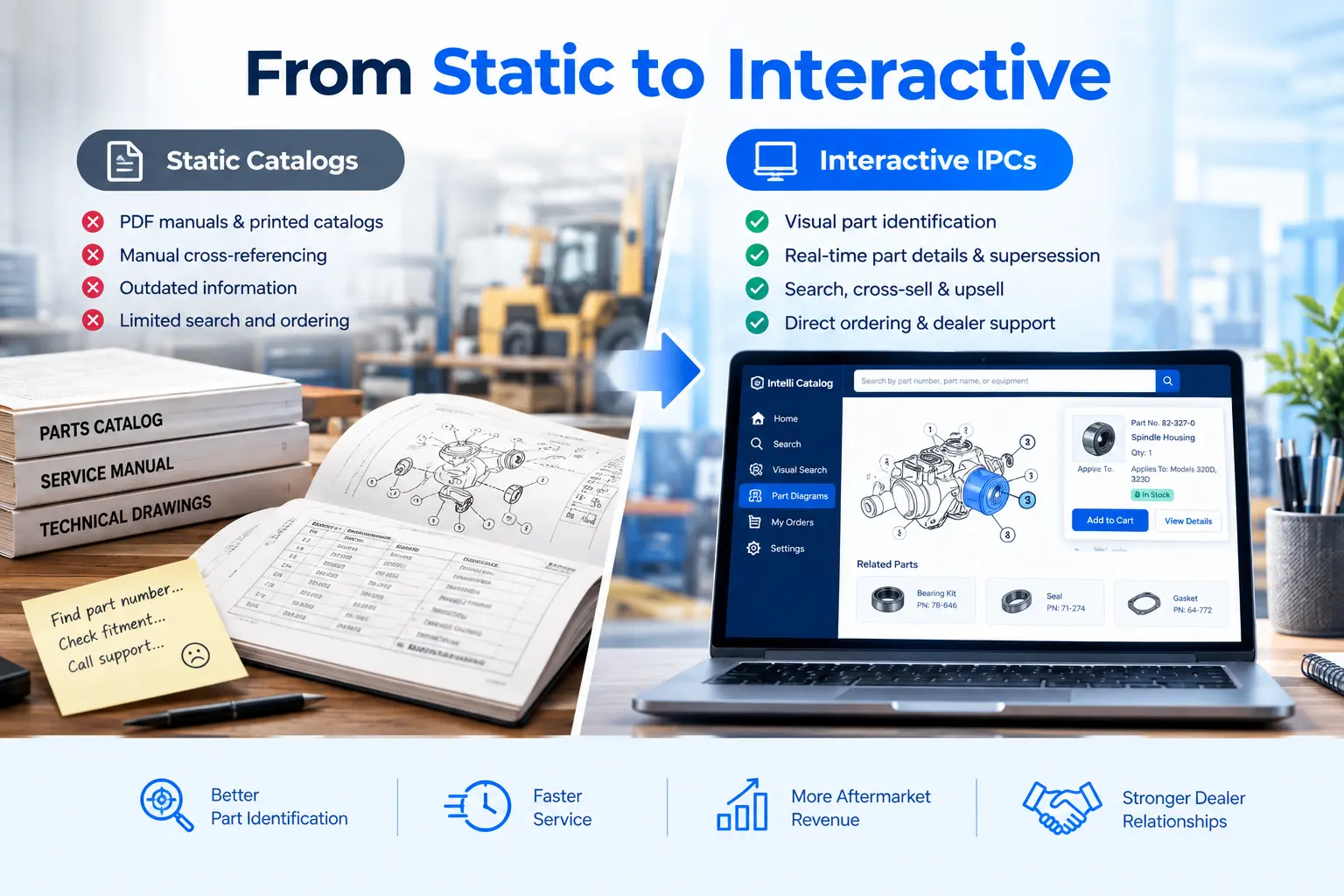
There are many manufacturers who still depend on a combination of PDF manuals, printed catalogs, spreadsheets with information about part numbers and descriptions, and even information that is maintained manually. There was a time when these resources were sufficient when product portfolios were smaller, products weren’t that complicated, and dealer networks were easier to manage with manual systems.
However, the growth in technology and the expectations of improved and faster service have led to the exposure of these limitations of this approach:
- Manual parts identification consumes time: Parts identification is a crucial aspect of the entire aftermarket process, and faster identification can lower wait times and provide faster service. If a technician faces a delay in identifying a component, this process could mean he is referring to multiple documents and even contacting a dealer support team for confirmation.
With an IPC, this process is simplified, as the technician can see the component in the diagram with an exploded view so he can easily identify the part. All information related to that particular part/component is available to him. This reduces the service delivery time and improves the aftermarket function. - Outdated information increases ordering risks: Products are upgraded, and the designs can obviously change. It is a process of evolution of a product. There could be modifications to various components, and part numbers could also change. In these cases, replacement parts are introduced. These changes need to be reflected across the distributed documents consistently. Failure to do so can lead to incorrect parts being ordered, as dealers could be referring to information that is outdated.
A catalog that is centrally managed can ensure the information accessed by users is the latest and that there are no discrepancies in the presented data. This is done through a controlled publishing process. - Product variants complicate compatibility: If there are two machines which are within the same product family, they can have two different components, as they might have different manufacturing dates; these added specifications could be regional in nature, could be technical revisions, or could be optional configurations.
With an integrated catalog, it is easy to find this information if the part is specific to the machine being served or it is a common part for all the variants in the product family. - Disconnected systems create duplicated work: There are different systems used by different teams, such as an engineering team may maintain CAD data, whereas the product teams might manage BOMs. Spare part databases would be maintained by the aftermarket teams. If these systems are not connected, there would be duplication of data across multiple systems.
A catalog that acts as a solution and integrates all these systems to work as one reduces repetitive work and improves efficiency and consistency across platforms. - Dealer support becomes difficult to scale: When an OEM expands into new areas or penetrates new market demographics, the support teams must be ready to serve more dealers; they could also be working with completely new languages, new products or configurations. Manually handling all this sounds very tiring.
But an interactive spare parts catalog works as a scalable digital channel which provides access to all information related to the product, with no dependence on manual catalogs.
The whole objective here is to create a scalable digital channel that ensures access to the correct information any time it's required.
How to Build an Illustrated Parts Catalog from CAD and BOM Data
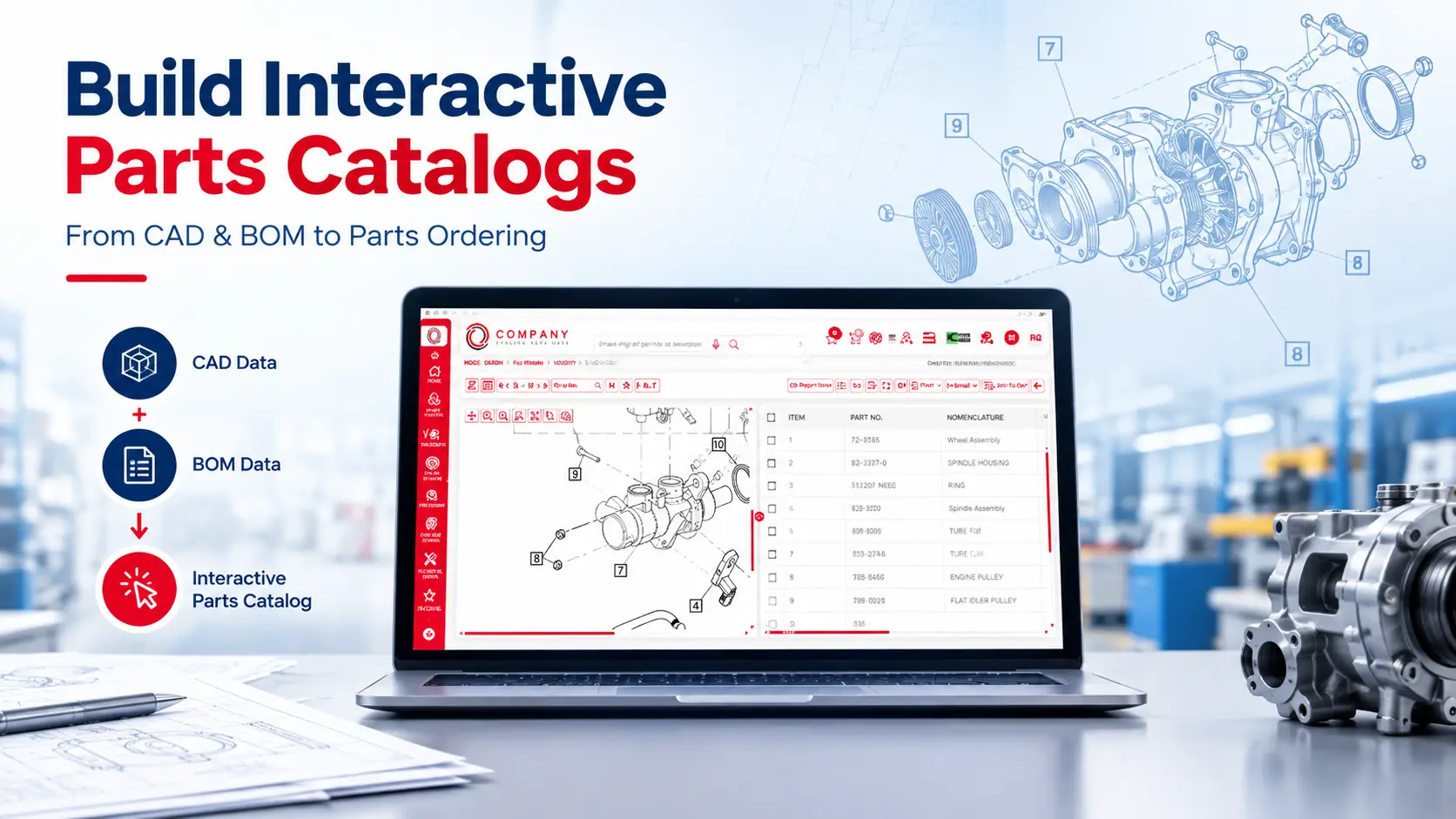
CAD and BOM data are crucial components and are two distinct systems that help with information related to a part and its relationship to the assembly. CAD helps with understanding the geometry and visual structure of a product or component, whereas the BOM data helps in identifying the underlying components and their relationship with the product.
The catalog software uses these two platforms and the data to map the structure, navigation and interactive information about the parts.
Let us now see the steps on how to build an IPC from CAD and BOM data:
Step 1: Collect and Organise CAD Files: The digital representation of product components, assemblies, and subassemblies is contained within the CAD file. These files are created when the product is designed and engineered.
These files may include 2-dimensional or 3-dimensional assembly relationships, identifiers of components, and other relevant attributes related to the engineering process.
Step 2: Extract and Validate Bill of Materials: The BOM is a structured list that contains components, subassemblies and the quantities required to manufacture or assemble the product.
To understand with an example, a BOM for an industrial pump will contain the pump housing, impeller, shaft, bearings, and other relevant components.
An OEM should always validate the BOM before it is used in an IPC, as sometimes a service-oriented spare parts catalog might not always serve the exact same purpose. Conversely, aftermarket catalogs might need additional details like replacements of service, serial number ranges that are applicable, and relationships with a superseded part or component.
Step 3: Map CAD Illustrations to BOM Data: This is a crucial step in the entire configuration process of building an interactive spare parts catalog.
A catalog must be able to establish a reliable connection between the CAD illustration and BOM data. This is because a CAD shows where a component is appearing in the assembly, and a BOM identifies that same component in the structure of the product.
Step 4: Create Exploded Views and Interactive Hotspots: To understand how the individual parts in the assembly are related to one another, an exploded view is required to separate the components of the assembly in a visual manner.
This is particularly useful during spare parts identification, as it helps make it easier to distinguish the individual components which would otherwise appear together in an assembly diagram.
Step 5: Structure the Catalog Around Products and Assemblies: After the process of mapping visual data and elements, it is paramount that they must be organised into a logical navigational structure.
The most common hierarchy could look something like:
Product Family -> Product Model -> System -> Assembly -> Component
This hierarchy is important as it helps users navigate from a broad product category to the exact assembly they need during their search.
Step 6: Add Applicability and Replacement Information: Now that we have added a logical navigation and also mapped the CAD and BOM data, it is just one part of the process. Identification of a part is half the battle won; it is imperative for a user to establish whether it is correct for the equipment being serviced.
This applicability data includes model numbers, serial-number ranges, dates of production/manufacturing, region-specific configurations, or other product attributes. This becomes especially important when an OEM has introduced changes in engineering over the lifecycle of a product.
Step 7: Configure Search, Access, and Ordering: User experience plays a vital role in establishing the idea of a ‘single platform to manage all your aftermarket operations’. Once the catalog structure and the records of all the parts are established, user experience comes at the next step.
Search options could include various options such as: part-number search, description search, model search, diagram-based navigation, serial-number search, and VIN-based lookup options. This makes it possible for the user to search through multiple parameters and still get to the exact information.
If the catalog intends to support the ordering process, it needs to be connected to relevant enterprise systems that are used for ordering and order management.
Step 8: Validate, Publish, and Maintain the Catalog: Now that all the attributes are set up and processes have been established, user experience is also built into the catalog process; it is now important for the OEM to validate both visual content and the underlying data in the catalog. Post-publication, a catalog would require ongoing maintenance. It should be able to accommodate any changes related to engineering, new product variants, new and updated variants, and revised replacement parts, which should be reflected through a controlled update and publishing process.
How Intellinet Systems Helps OEMs Build Interactive Catalogs
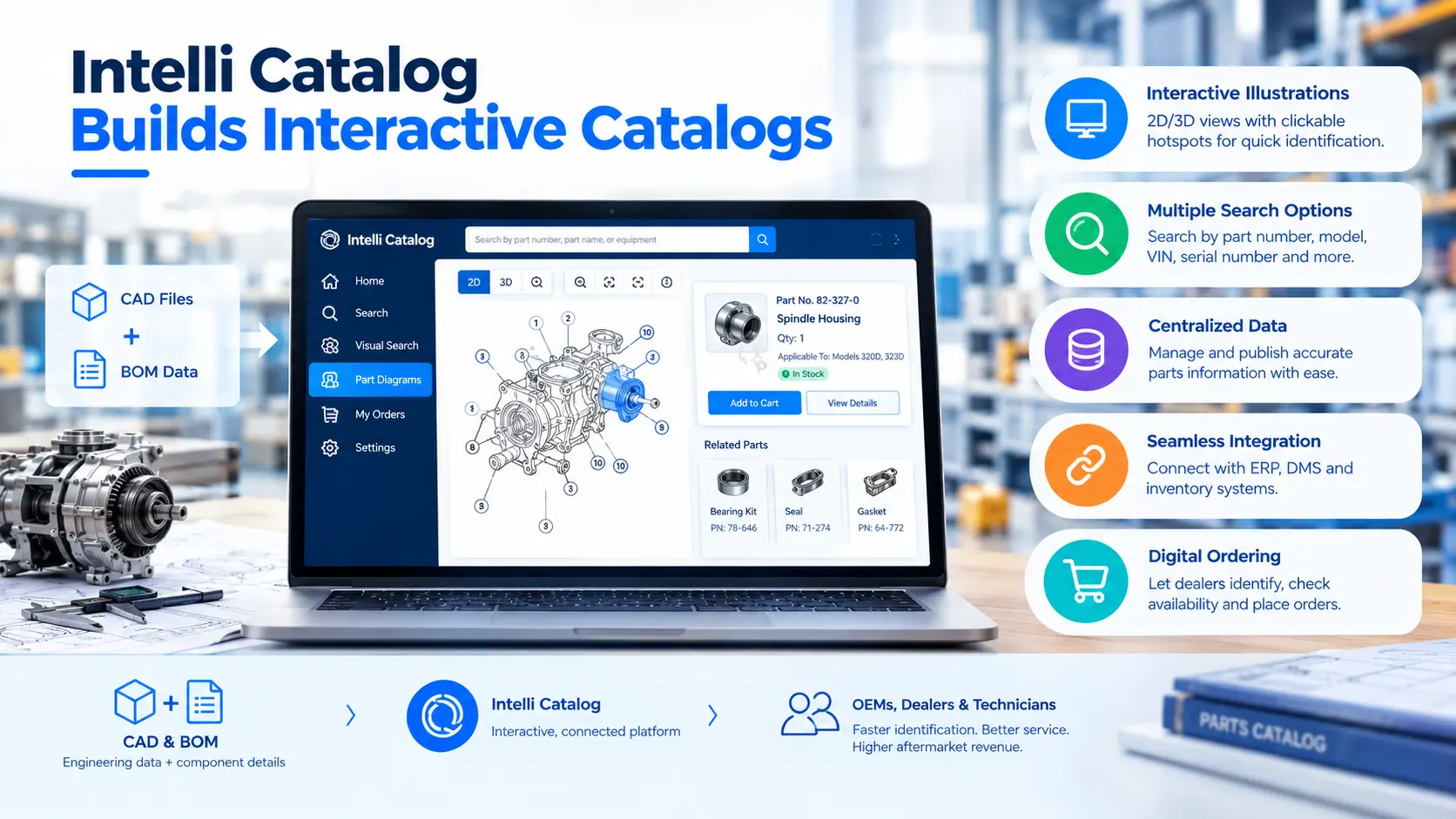
With advancements in technology, products have become sophisticated, with complex parts and electronics. For manufacturers looking to modernise their aftermarket operations and functions, Intellinet Systems offers Intelli Catalog which is an electronic spare parts catalog solution specifically designed for OEMs to manage their aftermarket operations. It helps in managing the spare parts information and also supports dealer parts identification, and has an inbuilt ordering process.
It works as an integrated, connected platform that brings illustrated parts information and digital catalog workflows in a single environment to provide dealers with more accessible product information.
Here are some key capabilities of Intelli Catalog:
Interactive 2D and 3D Illustrations: This illustrated spare parts catalog provides visual parts identification and also shows highlighting of the components with hotspotting features that helps users select parts from the illustrated assembly diagrams.
Multiple Search Options: It incorporates various search options, which are supported through search parameters such as part number, model, VIN, serial number, and figure search. This highlights the all-round search options available to users depending on the product and use case.
Centralised Parts Information: As a structured catalog, Intelli Catalog helps OEMs manage and publish parts information that is informative to their dealers. It also has an inbuilt feature that lets OEMs dedicate a user to manage and publish all parts-related information in an organised, workflow-managed publishing mechanism.
Parts Supersession Management: We have already understood what supersession means and the importance of this feature in an interactive parts catalog. Implementing this feature enables users to understand and identify the current service components and also get information about relevant part history.
Enterprise System Integration: It is imperative for an illustrated parts catalog to be linked with enterprise systems to have an integrated and connected workflow that reduces errors and provides all information about a part and its technical details. This also helps in establishing ordering workflows, supporting a connected catalog, and improving service delivery.
Digital Ordering Support: Having a connected workflow doesn’t only mean that there are multiple systems connected but also means having an integrated working mechanism for improving user experience. With Intelli Catalog, users can have an integrated experience by not just identifying parts and understanding the technical details about them, but also having an integrated ordering feature which not only saves time but also ensures there are no incorrect orders and that dealers place orders in the exact numbers that are needed, as per the relationship between the component and assembly.
Conclusion
For OEMs to create an efficient, accurate, and scalable aftermarket solution, building an illustrated parts catalog by integrating CAD and BOM data is an important step.
Through a strategic combination of engineering illustrations with structured component information, OEMs can enable a transformation of complex product data into an extremely practical resource for dealers, distributors, and service technicians. An interactive parts catalog takes it a notch further through a connected platform that links individual components to their corresponding part records, information about applicability, and supported ordering workflows.
The benefits of this system extend across the product lifecycle value chain. Dealers are able to identify parts with greater efficiency, relevant product information can be accessed by technicians, and by reducing the dependency on manual parts identification processes, OEMs can improve the catalog consistency.
For more details about how Intellinet Systems can add value in implementing such a system and to know more about these connected systems and their impact on the overall product lifecycle, please write to us at sales@intellinetsystem.com to schedule a free demo.
Frequently Asked Questions
What is an illustrated parts catalog software?
An illustrated parts catalog software is a digital solution that offers a connected solution that combines engineering illustrations with BOM data, providing part numbers, part descriptions, and other relevant product details in a single searchable system. It enables users to identify components from visual details and also retrieve all the product details required to verify and order parts.
How does an interactive parts catalog differ from a PDF parts catalog?
A PDF catalog is a combination of static illustrations and a part list that need to be manually cross-referenced. Whereas an illustrated parts catalog connects the illustrations of the components to structured information that provides part records, which allows users to select the components, access the details, search product information, and also access the ordering functions within the same digital system.
What is the role of BOM data in a parts catalog?
BOM is the data which identifies the components and also establishes their relationship in an assembly. Much important information, such as part numbers, quantities, and assembly structures, sits within this data. When illustrations are mapped with this data, it transforms the usability and enables users to identify the individual components and also retrieve the relevant parts information.
Can an illustrated parts catalog integrate with ERP and dealer management systems?
Yes. It can be connected, and this integration results in a direct connection between parts information and inventory data, pricing information, order management, and dealer management workflows. OEMs can experience this transformation as Intelli Catalog can be integrated with most of the ERP systems and DMS workflows.
How does an interactive parts catalog reduce spare parts identification errors?
When visual components are connected to the structured parts records, they provide all information about product applicability and replacement parts data. This helps verify the user's selection instead of relying only on descriptions or manual data such as static illustrations or parts lists.


Explore More Insights







.webp)


About the Author


Nishant Sharma
Nishant Sharma is the Head of Demand Generation at Intellinet Systems, specializing in B2B marketing, sales, digital transformation, and automotive aftermarket solutions. He shares insights on emerging technologies, industry trends, and strategies that help OEMs and businesses improve operational efficiency, customer experience, and aftermarket growth.


