

Overview: Technical manual version control is the process of tracking, tagging, and synchronizing every edition of a technical manual so dealers and technicians always open the version that matches the exact model, trim, and build date in front of them. Static PDFs and printed manuals cannot do this well, since a revised page can take weeks to reach every service center. An interactive electronic manual (IETM) solves this by hosting content in a cloud-based system, where every technical manual update publishes once and reaches every device at the same time. For OEMs launching new models every year, that shift is what keeps documentation matched to the equipment actually on the shop floor.
Key Takeaways:
- Technicians can spend up to 30% of their work time searching manuals, while inconsistent documentation can cost a single plant more than $107,500 per year in downtime, retraining, scrap, and audit-related expenses.
- Static PDFs and paper manuals make it difficult to ensure technicians are using the correct version for the model, trim, and build date.
- Interactive electronic technical manuals (IETMs) enable real-time updates, searchable content, and centralized version control across every connected device.
- A structured version control process reduces rework, warranty claims, and compliance risks by ensuring every change is tracked, approved, and published consistently.
- Intelli Manual converts existing PDF manuals into interactive, version-controlled IETMs, ensuring dealers and technicians always access the latest approved edition.
What is Technical Manual Version Control?
Technical manual version control is a system for tracking every change made to a technical manual, tagging it with a version number, date, and model applicability, so the correct edition reaches the correct audience automatically. Inside an IETM, this happens through the cloud rather than through reprints or email attachments
In a PDF-based or paper-based workflow, version control is manual by nature. Someone has to track which file is current, email it to every dealer, and hope nobody keeps using the old copy. An interactive electronic technical manual removes that dependency. Content lives in a single hosted system, so when a new version is published, every connected device automatically displays the latest version instead of one downloaded last year.
A working version control record inside an IETM typically includes:
- A version number tied to the manual, not just the file name
- The model, trim, and build date range the version applies to
- The date a change was approved and the date it went live
- A short note on what changed and why (recall, spec correction, new feature)
- A record of who approved the change and who published it
Why Static PDFs and Paper Manuals Break Down at Every New Model Launch
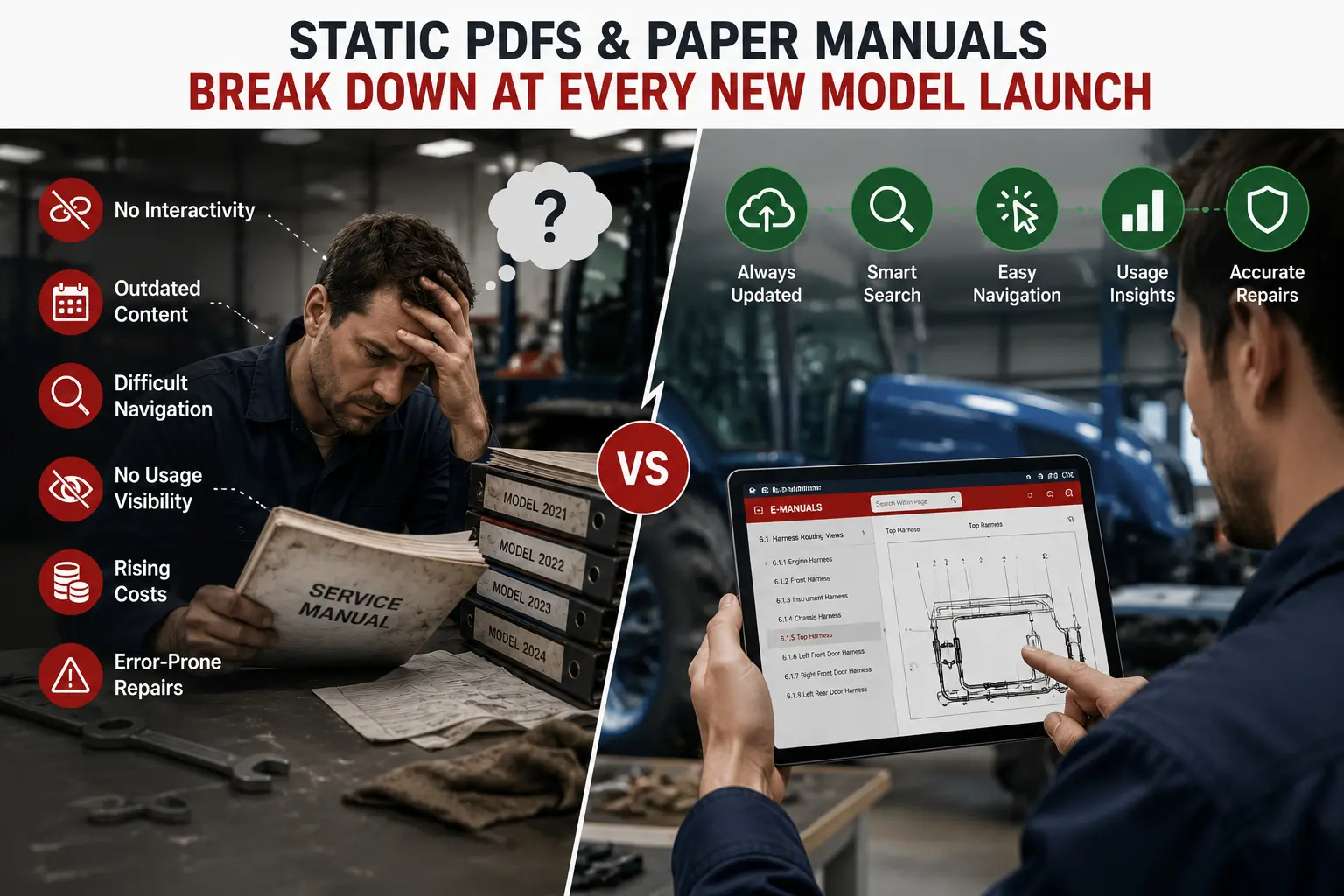
Paper manuals and plain PDFs were built for a slower product cycle. When a new model launches every year, their lack of interactivity, weak search, and slow update process turn small revisions into weeks of lag between what engineering approved and what technicians actually see.
The most common failure points show up the same way across automotive, agriculture, construction, and industrial equipment OEMs. A few of the most common causes:
- No interactivity: a plain PDF has no internal links to a specific procedure, so technicians flip through hundreds of pages to find one torque spec
- Outdated content: because PDFs are static files, a revised manual can take weeks to redistribute worldwide, leaving technicians working from the wrong edition
- Difficult navigation: searching a PDF returns a flat list of page matches, not the specific step a technician actually needs
- No usage visibility: PDFs give OEM no data on which sections technicians open most, so confusing content never gets flagged
- Rising costs: printing, shipping, and reprinting revised manuals across hundreds of service centers adds up fast, every single model year
- Error-prone repairs: flat diagrams without zoom or 3D detail get misread, leading to wrong parts, rework, and repeat visits
Each of these is manageable on its own. Stacked together, year after year, they are why so many OEMs end up with dozens of manual versions in circulation and no reliable way to tell which one a technician is holding.
The Real Cost of Outdated Technical Manuals
Outdated manuals are not just an inconvenience. They show up directly on the balance sheet through wasted technician time, incorrect repairs, repeat warranty claims, and compliance exposure, and the cost compounds every year new models launch without a fix.
Technician time is the clearest cost. A 2025 field study of aircraft maintenance technicians found they spend up to 30 percent of their work time searching manuals for the correct procedure, according to research published on arXiv. The same pattern shows up in ground equipment maintenance, where industry benchmarks cited by Fabrico show technicians completing only about 35 percent of an 8-hour shift on actual repair work, with time lost walking to find schematics and manuals a major contributor.
Documentation gaps also carry a direct dollar figure. One manufacturing analysis from Lean Tech modeled a single plant losing over $107,500 per year due to downtime, retraining, scrap, and audit fines tied to inconsistent or outdated documentation, and called that figure conservative.
Warranty operations feel it too. Manufacturer warranty claims average a 5- to 8-day cycle time, longer than most other industries, largely because of the technical review steps involved, according to 2026 warranty processing benchmarks. A technician working from the wrong manual version mid-claim only stretches that timeline further.
What Is an Interactive Electronic Technical Manual (IETM)

An IETM is a cloud-based, searchable version of a technical manual that replaces static pages with clickable navigation, zoomable diagrams, and AI-assisted search. Unlike a basic digital file, it updates in real time across every device, enabling reliable version control.
A plain electronic technical manual (ETM) is really just a digital file, often a PDF with a basic search box. An IETM extends these capabilities with an HTML interface, natural language search, and multimedia elements such as videos and 3D models. Because it runs in the cloud, a single published update reaches every technician’s device without a reprint or a re-download.
Industry practice generally sorts IETMs into five levels, from least to most capable:
- Level 0: scanned paper manuals stored as images, slow to search and prone to errors
- Level 1: digitized PDFs with basic hyperlinks, workable for simple equipment but not true interactivity
- Level 2: structured HTML with menus and basic search, suited to moderately complex machinery
- Level 3: interactive manuals with video and 3D models, built for complex systems but often without AI search
- Level 4: fully interactive, AI-assisted manuals with real-time updates and usage analytics, built for OEMs running global service networks
Version control quality tracks closely with this scale. A Level 0 or Level 1 manual has almost no way to guarantee that a technician is looking at the current edition. A Level 4 manual makes that guarantee by default, since content is served live from one source rather than distributed as copies.
Best Practices for Technical Manuals Update Cycle
A reliable technical manuals update cycle rests on a small set of repeatable habits: capture every change at the source, route it through one approval step, version it clearly, publish it everywhere at once, and formally retire what it replaces.
Use this checklist to evaluate your current process:
- Capture changes at the source. Engineering, quality, and service teams log changes in one shared system, not scattered emails
- Set a single approval owner. One person or team signs off before anything publishes, even for minor corrections
- Version every release. Use a consistent numbering system (major.minor) so anyone can tell which edition is current
- Tag by model, trim, and build date. A version number alone does not tell a technician if it applies to their unit
- Publish to every channel at once. Print, PDF, dealer portal, and mobile app should never show different versions
- Retire old versions formally. Mark them superseded rather than leaving them live and discoverable
- Keep a change log. A visible history of what changed and why builds trust with dealers and auditors

How to Build a Technical Manual Version Control Process
Building version control into your documentation workflow takes seven steps: centralize your source files, standardize version numbering, tag content by model and build date, formalize review and approval, automate distribution, retire outdated editions, and track the full change history.
- Create one source of truth: Move all manual content into a single system instead of separate files held by different teams
- Standardize version numbers: Adopt a major.minor format (2.0,2.2) so small corrections and full revisions are easy to tell apart
- Tag content by model, trim, and build date. This is what lets a technician confirm a manual applies to the unit in front of them
- Formalize review and approval: Define who signs off on content before it publishes, and require that step every time
- Automate distribution. Publish updates to print, PDF, dealer portal, and mobile access points at the same time, from the same source
- Retire outdated versions. Superseded manuals should be clearly marked or removed from active circulation, not just left online
- Track change history. Keep a permanent, searchable record of every version, its approval date, and what it changed
How Intelli Manual Applies Version Control While Converting PDFs Into IETMs
Intelli Manual converts existing PDF manuals into interactive, cloud-hosted IETMs and applies version control on top, so every dealer and technician opens the edition that matches the model they are working on the moment it publishes.
The conversion runs in stages. Intelli Manual first parses text and images out of the source PDF and rebuilds them into an HTML interface, replacing flat pages with zoomable diagrams and clickable navigation. AI-driven search then lets a technician type or speak a request, such as finding a torque specification, and get a direct answer instead of scrolling through the document. Core capabilities built around this process include:
- Multiple search functionality: index search, keyword search, page search, and full-content search across every manual
- Voice interaction: technicians can request a section hands-free, useful when both hands are on the equipment, with multilingual support built in
- Cloud access: manuals sync across web, iOS, and Android, and a published update reaches every device without a manual download
- Analytics dashboard: usage data shows which sections technicians search for most, flagging content that may need clarification
- Secure controls: ISO 27001-aligned access controls and watermarking support standards such as MIL-STD and S1000D for regulated industries
- QR-driven video access: technicians scan a code inside a procedure to pull up a short repair video on their phone, without a separate search
- Visual reviews: reviewers flag and correct specific sections inside the manual directly, replacing email threads and screenshots
- Real-time updates: every revision is pushed to the whole network at once, closing the gap between an approved change and what technicians see
Evaluation Criteria for IETM and Manual Management Software
When comparing platforms for technical manual version control, evaluate them against six criteria: version tagging accuracy, cloud-based access across devices, search quality, system integrations, security certifications, and scalability as your manual library grows.
- Version tagging by model, trim, and build date, not just a file name or upload date
- Cloud-based access that works the same way on a phone, tablet, or laptop in the field
- Search that supports keyword, index, page, and natural language queries
- Integration with your existing dealer management system, parts catalog, or ERP
- Security certifications and access controls suited to your industry, such as ISO 27001, MIL-STD, or S1000D
- Capacity to handle thousands of manuals and users without a drop in performance as you grow
Conclusion
Launching a new model every year is not optional for most OEMs, but sending technicians into the field with an outdated manual is. Technical manual version control gives documentation teams a repeatable way to capture every change, tag it to the right model and build date, route it through approval, and publish it everywhere at once. Static PDFs and paper manuals were never built to do this well, which is why the gap between an approved change and what a technician actually sees keeps widening as launch cycles speed up.
An interactive electronic technical manual closes that gap by hosting content in one cloud system rather than distributing copies. Intelli Manual applies this approach directly, converting existing PDFs into searchable, version-controlled IETMs so every technical manual update reaches every dealer and technician the moment it is published, without a reprint, a re-download, or a guess about which edition is current.
See how Intelli Manual turns static PDFs into version-controlled, interactive IETMs. Schedule a demo.
FAQ
What is the difference between technical manual version control and a basic document management system?
Document management stores files. Technical manual version control tracks the relationship between those files by identifying which version applies to each model, trim, and build date, what changed between versions, who approved each change, and which edition is currently active. A document management system can hold ten copies of a manual with no way to tell which is current. An IETM answers that question automatically because content is served live from one hosted source.
How is an IETM different from just putting a PDF online?
A PDF posted online is still a static file. A dealer can download it once and keep using that copy long after it is superseded. An IETM ties access to the live, current edition instead, adds clickable navigation and AI search on top of the same content, and gives OEMs usage data that a plain PDF cannot provide.
How often should OEMs run a technical manuals update?
Most OEMs need two update cadences: a scheduled update tied to each new model year launch, and an as-needed update triggered by mid-year running changes, safety recalls, or supplier part substitutions. Waiting for the annual cycle alone leaves gaps whenever engineering makes a change between launches, which is one of the most common causes of outdated content reaching dealers.
Do we need Level 4 IETM capability, or is a simpler digital manual enough?
It depends on how often your models change and how distributed your service network is. A single product line with rare revisions may get by on a Level 2 or Level 3 manual. An OEM launching new models every year across many service centers benefits most from Level 4 capability, since real-time updates and AI search are what actually close the version control gap at scale.
What happens if a technician follows an outdated manual for a safety-critical procedure?
The immediate risk is an incorrect repair, which can lead to rework, a repeat warranty claim, or in serious cases a safety incident and liability exposure for the OEM. The underlying cause is almost always the same: no system existed to flag the manual as superseded or to guarantee the technician was looking at the current version in the first place.


Explore More Insights






.webp)


About the Author


Chandra Shekhar
Chandra Shekhar is the Senior Manager, Strategy & Business Development at Intellinet Systems. With over a decade of experience in the automotive industry, Chandra Shekhar has led digital transformation and aftersales strategy initiatives for OEMs across multiple markets. His background combines deep industry knowledge with a practical understanding of how technology can solve real operational challenges. He focuses on making complex ideas clear and relevant for automotive and aftermarket professionals navigating ongoing change.


